Outsource Mobile App Development: How to Pick the Right Model

In this article
- The Decision That Comes Before Vendor Selection
- The Mobile-Specific Failure Modes
- The Mobile App Cheapshoring Trap
- When Project Outsourcing Works for Mobile
- Vetting Any Mobile Outsourcing Partner
- Red Flags Specific to Mobile Outsourcing
- Structuring for Success Either Way
- The Decision Framework
- Ready to Build Your Mobile Team?
- Frequently asked questions
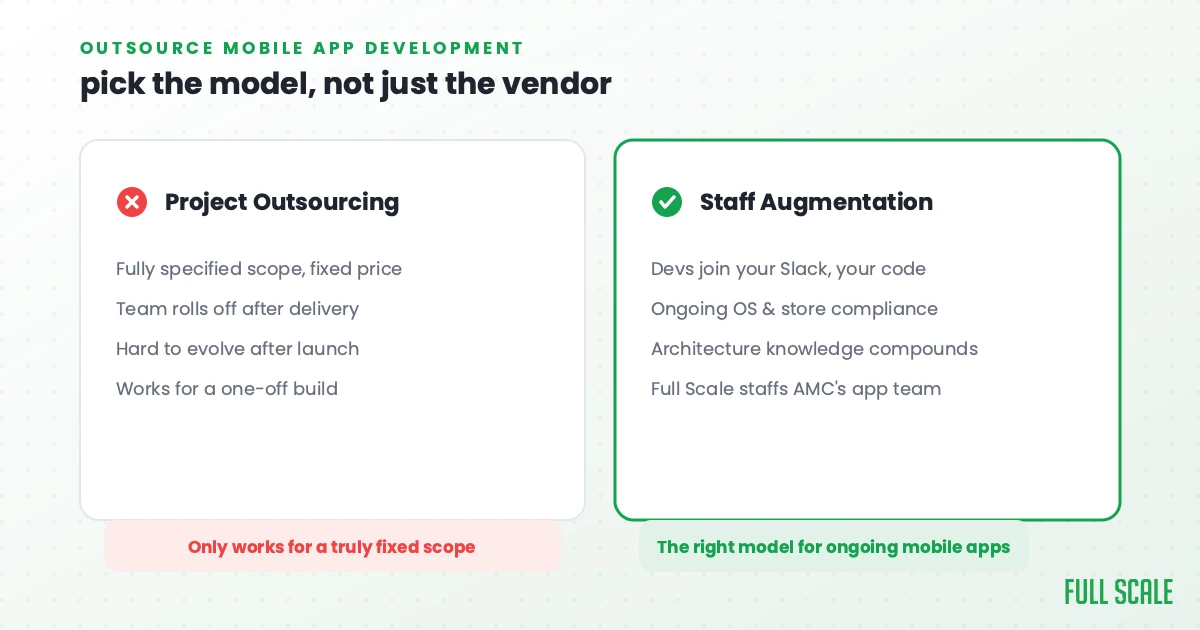
Quick Answer: Outsourcing mobile app development usually means one of two models: project outsourcing, where a vendor delivers a scoped iOS or Android build, or staff augmentation, where mobile developers join your team long-term. For most ongoing mobile work, staff augmentation wins because apps need continuous OS updates and app store compliance that a fixed scope can’t cover. Full Scale places senior mobile engineers under this model, the same approach AMC Theatres uses for its iOS and Android team.
Most companies that get burned by mobile app outsourcing don’t realize the failure is coming. A fuzzy brief is the usual culprit, which is why writing a sharp mobile developer job description comes first.
The app looks right in the demo. The screens navigate. The core flows work. Then you submit to the App Store and the review team rejects it for a Privacy Manifest violation your vendor had never heard of. Or the app ships and crashes on specific Android manufacturers because the developers tested on one emulator. Or you open the codebase to add a feature and find that the “senior iOS developer” wrote UIKit code in a SwiftUI project. Technically functional, architecturally wrong in ways that compound with every addition.
These failures are mobile-specific. They don’t happen with the same frequency in web development, because web doesn’t have gatekeepers (the App Store and Google Play) who enforce technical requirements that many offshore developers have never actually navigated.
I’ve been building mobile apps since before iOS or Android existed. My first mobile app ran on a Compaq iPAQ in the early days of VinSolutions. I shipped iOS and Android apps at Stackify. And at Full Scale, I’ve placed mobile developers with US product teams and worked with companies recovering from exactly the failures described above.
This guide is the decision framework most companies skip before signing with a mobile outsourcing vendor.
The Decision That Comes Before Vendor Selection
Before you evaluate a single mobile development vendor, answer two questions.
Question 1: What platform are you actually building for?
“Mobile app development” covers four distinct disciplines:
- Native iOS (Swift + SwiftUI, Xcode, App Store)
- Native Android (Kotlin + Jetpack Compose, Android Studio, Google Play)
- Flutter (Dart, cross-platform iOS + Android + web)
- React Native (JavaScript/TypeScript, cross-platform iOS + Android)
The vetting criteria, architecture decisions, and failure modes differ significantly across these. A vendor who does “mobile development” without specifying platform depth is probably strong in one and weaker in the others. Get specific about what you need before evaluating anyone. On iOS, that starts with spelling out the real iOS developer responsibilities and settling Swift versus Objective-C. On any platform, part of the build is the backend for a mobile app, the server side that handles data, logins, and APIs.
Question 2: Do you need a scoped deliverable or an ongoing team?
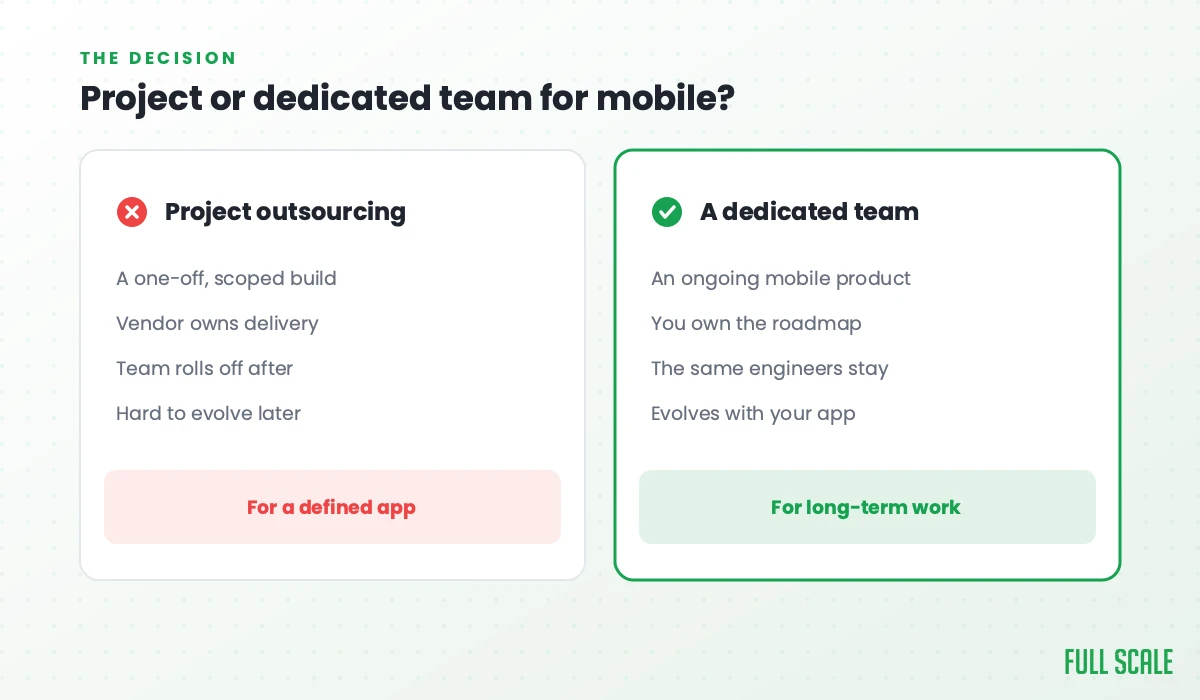
Project outsourcing delivers a defined scope of mobile work. You specify what gets built. The external team builds it. You receive an app or feature. This works when scope is genuinely fixed and defined before work begins.
Staff augmentation means offshore mobile developers join your team. They’re in your Slack, in your codebase, in your code review queue. They work on your roadmap continuously. This is what most companies searching for “outsource mobile app development” actually need: ongoing product development with a distributed team.
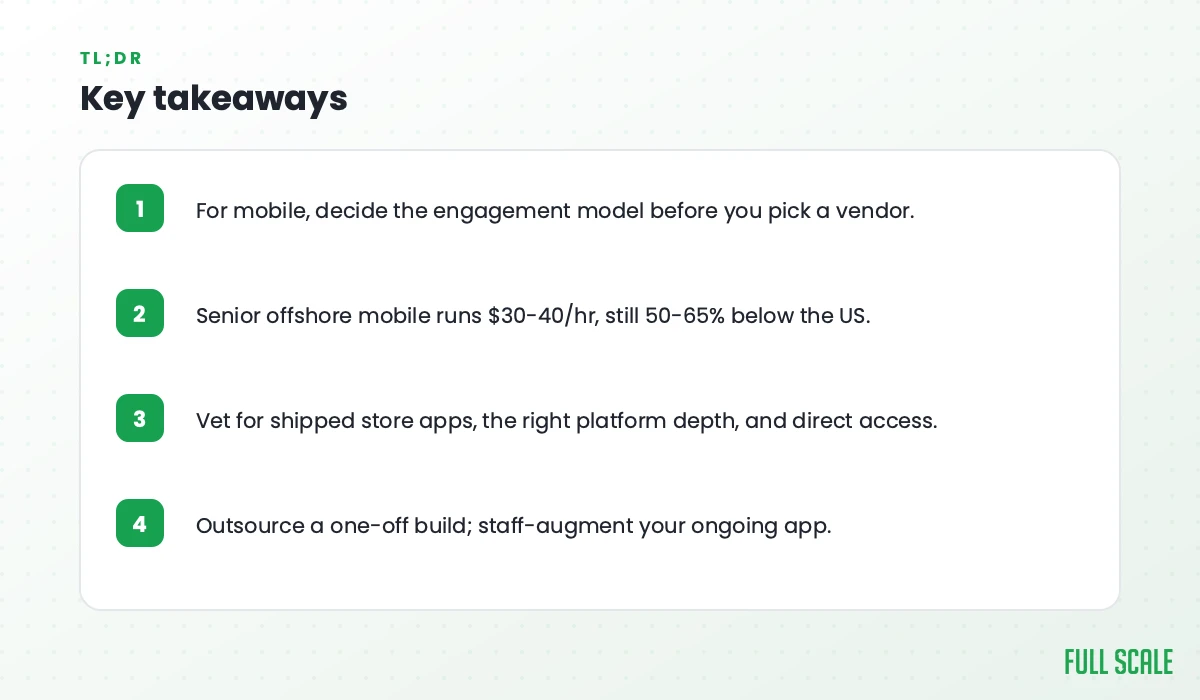
These two models have different vendor profiles, different pricing structures, and different failure modes. Confusing them is the source of most mobile outsourcing failures. The staff augmentation vs. outsourcing decision shapes everything downstream.
The Mobile-Specific Failure Modes
Mobile app outsourcing has failure modes that don’t exist for web development. Most buyers never test for them.
The platform depth gap
“Mobile developer” understates the specialization required. A developer who’s strong in iOS is not automatically strong in Android. A React Native developer may not understand native module bridging. A Flutter developer may have never navigated App Store review. Strong in one platform means competent-at-best in the others without explicit experience. That is why, when a build is Flutter-first, we vet for it specifically through our Flutter development services.
When you hire a vendor who claims all platforms, test each platform specifically. Don’t accept “we do iOS and Android.” Ask for published apps in each platform, ask platform-specific technical questions, and if you need both iOS and Android native, consider whether two specialists (one per platform) outperform one generalist claiming both.
The app store submission gap
Both the Apple App Store and Google Play have submission requirements that many offshore developers have never personally navigated:
App Store: Review guidelines, Privacy Manifest requirements (mandatory since iOS 17 for privacy-impacting APIs), app signing and provisioning profiles, TestFlight beta distribution, App Store Connect metadata, phased releases.
Google Play: Target API level compliance (Google updates minimum requirements annually), Data Safety section (required disclosure of data collection), app signing with Play App Signing, internal and closed testing tracks, staged rollouts, Play Store content policies.
Project shops that have written mobile code but never managed a production app submission leave the submission entirely to you. If your team doesn’t have this knowledge, you’ll discover why it matters when your first submission is rejected.
What to do: Ask any mobile vendor directly, “Walk me through your process for submitting an app update to the App Store and Google Play.” Developers who’ve done this describe specific steps and specific rejection scenarios they’ve navigated. Developers who haven’t give general answers.
The cross-platform vs. native mismatch
Flutter and React Native are excellent frameworks chosen for the wrong reason: lower cost from a single cross-platform team. That reasoning isn’t wrong, but it breaks down in specific situations:
- Apps with heavy native hardware integrations (Bluetooth/BLE, NFC, camera, ARKit/ARCore) often perform better in native
- Apps with complex platform-specific UX expectations (navigation patterns users expect on iOS vs. Android) are easier to get right in native
- Apps requiring deep OS integration (HealthKit, CarPlay, Android Auto) need native expertise
If you’re choosing cross-platform primarily to reduce cost, make sure the use case fits. A poorly-chosen cross-platform approach creates architecture debt that’s expensive to unwind.
Device fragmentation handled wrong (Android especially)
Unlike iOS (where Apple controls the hardware), Android runs on thousands of device configurations: different manufacturers, OS versions, screen densities, hardware capabilities. Samsung’s Android implementation differs from stock Android. Older OS versions still in your install base may not support APIs that work on newer devices.
Mobile developers who test on one emulator and submit to the Play Store ship apps that break on real devices. This shows up in 1-star reviews and crash reports after launch. Android carries enough of these traps that I break down how to outsource Android app development on its own.
What to do: Ask about device testing strategy. What specific device configurations have caused production issues in their apps? What’s their approach to supporting older API levels? Developers with real production Android experience have specific answers.
The Mobile App Cheapshoring Trap
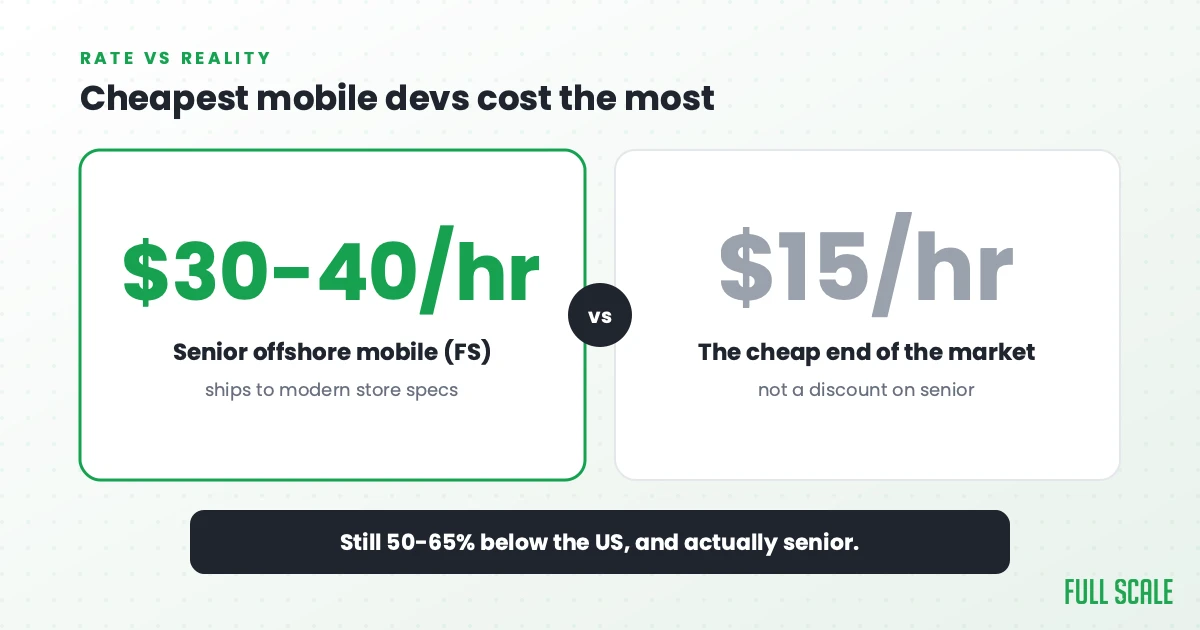
The offshore mobile market has a large, cheap end: vendors offering senior iOS or Android developers at $15-$25/hour. What “senior” usually means at these rates: developers who learned mobile in 2018-2020, haven’t adopted SwiftUI or Jetpack Compose, and have never submitted an app to a store’s modern requirements (Privacy Manifests, Data Safety forms, target API compliance).
I call this cheapshoring: offshoring for cost alone, without a real quality bar. For mobile it’s particularly damaging because the output, an app in someone’s pocket, is immediately visible to users and rated publicly in the App Store and Play Store.
Senior offshore mobile developers who’ve shipped to modern store requirements cost $30-$40/hour at Full Scale. Still 50-65% below the fully-loaded US equivalent, and the app developer hourly rate guide shows where that sits against US agencies and freelancers. The $15/hour rate doesn’t buy a discounted version of that. It buys a different product.
Deloitte’s 2024 Global Outsourcing Survey says skilled talent and agility now join cost reduction as key drivers for outsourcing. Mobile development is where this lesson is paid in 1-star App Store reviews.
When Project Outsourcing Works for Mobile
Some mobile work is genuinely appropriate for project outsourcing: scoped, specified, deliverable.
A well-specified feature with documented behavior. A specific screen with clear states and transitions. A push notification flow with a documented payload structure. A settings section with defined fields. These have real done states you can write acceptance criteria for before work begins.
A prototype or MVP with intentionally disposable architecture. You’re validating a concept and plan to rewrite before scaling. The architecture decisions are temporary by design. Understand upfront that the prototype will need significant rework.
A defined native integration. “Implement this Bluetooth peripheral connection using this documented SDK.” Clean interface, clear acceptance criteria, narrow scope.
What makes mobile project outsourcing work: the scope is fully specified before work starts, acceptance criteria include App Store and Play Store requirements, and you have a plan for who maintains the code after delivery.
What doesn’t work: ongoing feature development, apps that need to evolve with user behavior, any work where the developers need to understand your existing architecture to produce good output, and any engagement where you’ll be asking “why did you build it this way?” after delivery.
Vetting Any Mobile Outsourcing Partner
For any mobile vendor:
Test platform depth with platform-specific questions. Not “can you build mobile apps?” but: for iOS, can they explain the difference between @StateObject and @ObservedObject in SwiftUI? For Android, can they walk through what happens to their ViewModel when the user rotates the screen and why that matters? For Flutter, can they describe when they’d use a method channel? For React Native, do they understand the difference between the New Architecture and the old bridge?
Ask about App Store and Play Store submission experience. “Walk me through a recent app submission. What required your attention beyond the code itself?” Real experience produces specific answers.
Ask for published apps. Play Store links and App Store links. Actual apps you can install and evaluate. Developers who’ve shipped to production have listings.
Ask about device testing strategy. Emulator-only testing is a mobile red flag.
For staff augmentation:
Ask about their platform-specific vetting rejection rate. At Full Scale, fewer than 3% of applicants make it through our 5-stage vetting process. A vendor who can’t describe their rejection rate isn’t filtering hard enough. Our skills assessment methodology covers why rigorous vetting drives retention.
Ask about retention. Mobile developers who’ve been in your codebase for 18+ months know your architecture, your store history, your certificate configuration, and your release process. High turnover in a mobile team is expensive in ways that aren’t visible until you need that knowledge.
Check Philippine English proficiency in a real technical conversation. Bug reproduction, PR feedback, architecture discussion. These require both technical and communication depth.

Red Flags Specific to Mobile Outsourcing
“We do iOS, Android, Flutter, and React Native.” A small team claiming full depth in all four platforms almost certainly has one or two developers strong in each with generalists filling the rest. Ask specifically which developer would work on your project and test them on your platform.
No published apps to show. The most important portfolio artifact for a mobile developer is an app in the App Store or Play Store. If a vendor can only show you GitHub repos, ask why there are no published apps.
Vague answers about app store requirements. “We handle the submission” without specifics about Privacy Manifests, target API compliance, or the Data Safety form means they’ve done it once or have someone else doing it. Test for specifics.
One emulator in their test setup. Especially for Android. Real mobile QA involves real devices across multiple OS versions and manufacturers.
“We use whichever framework is best for the project.” That’s not an answer. Ask specifically: for a B2C app targeting both iOS and Android, under what conditions would you recommend Flutter vs. React Native vs. native for each? Real mobile expertise produces an opinion. Vendor-neutral language is a signal that framework selection is driven by what they happen to have available.
Structuring for Success Either Way
For a scoped mobile project:
Write acceptance criteria that include App Store and Google Play compliance, not just feature function. “The app passes App Store review with no rejections related to Privacy Manifests or guideline violations” is an acceptance criterion.
Specify the platform, framework, language version, and minimum OS support in the requirements. These are not optional preferences. They’re architectural constraints that shape every implementation decision.
Build in a device testing checkpoint before delivery: specific iOS versions and Android versions/manufacturers you require tested.
Plan the post-delivery maintenance path. Who manages the signing certificates? Who handles OS update compatibility? If it’s your team, build in a knowledge transfer phase.
For ongoing mobile staff augmentation:
Document your architecture before onboarding. Navigation patterns, state management approach, networking layer, push notification setup, CI/CD pipeline. The offshore mobile developer who understands these from Day 1 builds better features in month six.
Include them in sprint planning and product discussions from the first week. Mobile developers who understand the product decisions behind features make better architecture decisions for those features.
Build store submission into the team’s workflow. Who owns it? What’s the release process? Offshore developers who understand the submission process are a genuine asset.
The Decision Framework
| Your mobile situation | Better model |
|---|---|
| The scope is fully specified before work starts, and the acceptance criteria include App Store and Play Store compliance | Project outsourcing |
| The deliverable doesn’t depend on understanding your existing architecture, and you have a maintenance plan for after delivery | Project outsourcing |
| You have an ongoing mobile product roadmap | Mobile staff augmentation |
| The app has to evolve with user feedback and market changes | Mobile staff augmentation |
| Architecture knowledge compounds over time, and you plan to work with this team for 12+ months | Mobile staff augmentation |
When in doubt, the rule of thumb at Full Scale is simple: if you’re describing a product roadmap, use staff augmentation. If you’re describing a spec with a hard deliverable, you might be able to outsource it, but verify platform depth, app store knowledge, and device testing strategy first.
Ready to Build Your Mobile Team?
If you’re not sure whether your mobile situation is a scoped project or an ongoing team, schedule a consultation. Honest assessment. We’ll tell you if project outsourcing is the right fit even if that means Full Scale isn’t the right partner.
For the full guide on how the staff augmentation model works for mobile teams, read our offshore app and mobile development guide, including the 5-stage vetting process, the 7-day integration framework, and which mobile projects offshore well. You can also read what offshore development really means before committing to either model.
See real examples in our client case studies, including the AMC Theatres case study where Full Scale mobile developers work as full AMC engineers on consumer-scale iOS and Android apps.
Frequently asked questions
What’s the most common way mobile app outsourcing fails?
Three failure modes dominate: platform depth gaps (vendors claiming all platforms but with real depth in only one), app store knowledge gaps (developers who’ve written mobile code but never managed a production store submission), and using project outsourcing for work that requires ongoing team integration. At Full Scale, we test for all three before ever recommending an engagement model.
How do I know if a mobile vendor actually knows my platform?
Ask platform-specific architecture questions that require production experience. For iOS: SwiftUI state management, async/await concurrency patterns, app lifecycle handling. For Android: Kotlin Coroutines scope, Jetpack Compose recomposition, Google Play submission. For Flutter: state management choices, method channels, platform-specific UI. Ask for published apps on your platform. Developers who’ve shipped production apps answer these questions with specifics.
How much does outsourcing mobile app development cost?
Cost follows the model more than the rate card. For ongoing mobile work, quality staff augmentation runs mid-range for a senior mobile developer, not bottom-tier: senior mobile developers at Full Scale run $30-$40 an hour. Be skeptical of “senior” mobile development below $20/hour; the App Store and Play Store reviews will tell you whether the quality matched the rate. For a one-off build the spec matters more than the hourly. The full US-versus-offshore cost breakdown is in our offshore mobile app development guide.
Should I build native iOS and Android, or cross-platform?
Native is better when you need heavy native hardware integrations (Bluetooth, NFC, ARKit/ARCore), high performance, or deep platform-specific UX that users expect on each platform. Cross-platform (Flutter or React Native) is better when you want a single codebase across platforms and your use case doesn’t require heavy native integration. Flutter is the leading cross-platform option for performance-critical apps; React Native fits JavaScript-background teams. We help clients make this decision before placement. Framework choice is just one of the mobile trends that actually matter this year, alongside how AI changed vetting and whether you still need a custom backend. For the framework side specifically, see the cross platform app development frameworks comparison.
What app store experience should I require from a mobile vendor?
Ask about: App Store Privacy Manifest compliance (required since iOS 17), Google Play target API level compliance (updated annually), app signing and certificate management, TestFlight and internal testing track usage, and staged rollout strategy. Require published app links as portfolio. A vendor who can walk you through a real rejection they fixed is more credible than one who describes the process theoretically.
How do I prevent device fragmentation problems in outsourced Android development?
Build a device testing matrix into your acceptance criteria: specify the Android OS versions and manufacturer configurations you require tested (at minimum: latest Android, the version two releases back, a Samsung flagship, and a mid-range device). Ask the vendor about their real device testing setup, not just emulator coverage. Developers with production Android experience describe specific fragmentation issues they’ve debugged. Developers without it describe the theory.