AI Proof Interview Questions for Android Developers

In this article
Rotate the phone and the user’s half-filled form vanishes. It is the oldest bug in Android, and a developer who cannot explain why it happens has not really shipped on the platform. Catching it before it reaches users is the judgment you are actually hiring for, and most Android developer interview questions never go near it. They test definitions, and the day your candidate started using AI, definitions stopped telling you anything. Before the interview, get the Android developer job description right.
Look at the usual list. Explain the Activity lifecycle. What is the difference between an Activity and a Fragment. What is an Intent. Serializable versus Parcelable. A Service versus a BroadcastReceiver. What does the Application class do. For years those were the standard Android screen, and they made sense when the only place to find the answer was inside a developer’s own head.
Not anymore. A candidate with a chat assistant in the next tab returns every one of those in seconds, and explains them well. The knowledge still matters, you cannot debug a memory leak or reason about a configuration change without it, but it has stopped being something you can *screen* on. A clean answer no longer tells you whether the person earned it shipping real apps or read it off a screen a moment ago. A fluent recital used to signal experience. AI turned it into noise.
The work underneath moved too. AI now writes the layouts, the boilerplate, the routine Composables and adapters that used to fill a morning, which pushes the scarce part of the job up a level. A senior Android developer earns the title through judgment, not through typing Kotlin faster: knowing what happens to state when the OS kills your process, why the app drops frames on a cheap device, when work has no business on the main thread, and whether the screen should ship the way the ticket reads at all. The developers who only produce code are the ones AI replaces; the ones who can reason about a device in a user’s hand are the ones who end up leading.
So the questions have to follow the job. I have been shipping consumer software since before the smartphone, and the thing that still catches teams off guard about Android is how little a smooth demo on a flagship tells you about how the app behaves on the thousand other devices your users actually carry. At Full Scale we vet every Android developer on that kind of judgment, not on syntax quizzes, before they ever join a client team. This is the question set we use to find the ones who think. If you are hiring for the other side of mobile, our companion guide to iOS developer interview questions covers the Apple platform; this one is about Android.
Why lifecycle trivia stopped screening
The trivia rested on one assumption: that recall stood in for skill. If you could recite the Activity lifecycle, you had probably been burned by getting it wrong on a real device. Recall was a shortcut to the real thing.
AI removed the shortcut. A developer who has never shipped an app can now explain the lifecycle as fluently as someone who spent a week chasing a crash that only happened after the system reclaimed their process. You are not measuring what you think you are measuring. The trivia is still worth knowing. It just fails as a test now, because everyone passes and the pass tells you nothing.
What is left is the work AI cannot do for you. A model will generate a screen and a ViewModel in seconds. It will not tell you that the network call is on the main thread and will throw an ANR, that the Activity leaks because it outlived a config change, or that the screen does not need to exist. Those are judgment calls, and judgment is what a senior hire is for.
Watch for the trap here. When the syntax is free, the cheapest developer who can pass the puzzle looks like the obvious hire. That is the mistake I named cheapshoring: chasing the lowest rate and treating engineers as interchangeable people who type Kotlin. It was a weak bet before and a worse one now, because the cheap part is what AI already does for free. Android punishes it harder than most platforms, because the user who suffers your shortcut is on a budget phone on a weak network, and they leave a one-star review about it.
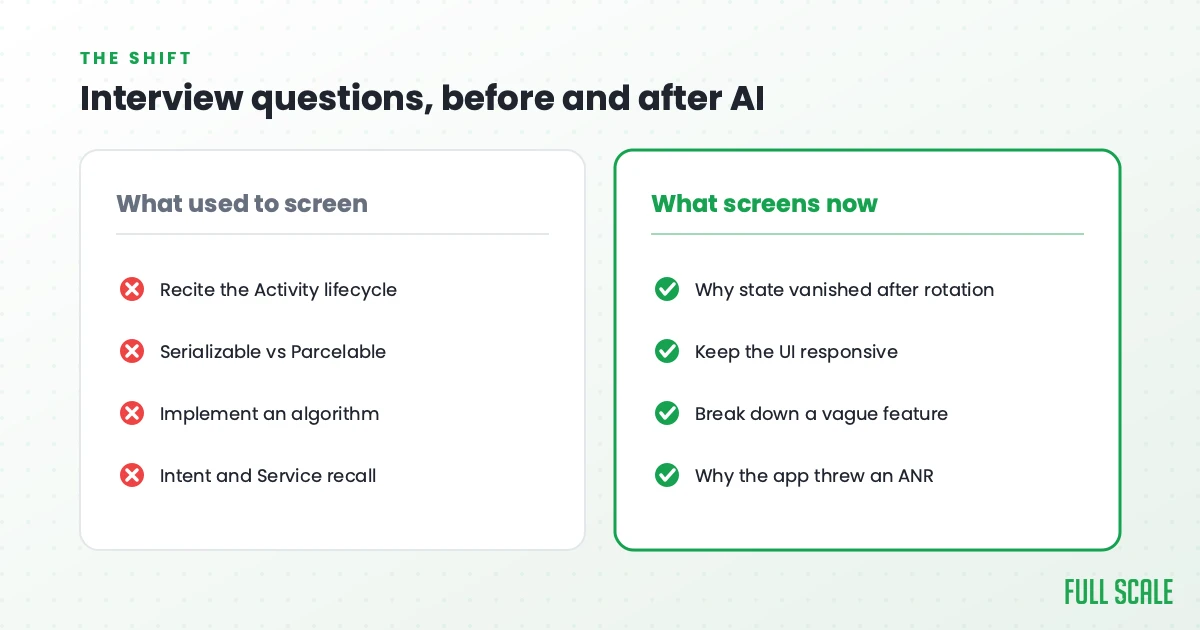
Here is the shift in Android terms:
| What the old questions tested | Why it no longer screens | What to test instead |
|---|---|---|
| Reciting the Activity lifecycle | AI answers it instantly; everyone passes | Why the user’s state vanished after a rotation or process death |
| Serializable versus Parcelable | Free to look up; can’t tell who has shipped | How they keep the UI responsive while real work happens |
| Implement an algorithm on a whiteboard | AI writes it; the job is rarely this | How they break down a vague, underspecified feature |
| Intent and Service recall | AI fills it in | Why the app froze and threw an ANR, and how they found it |
What to interview Android developers for now
If recall no longer screens, what replaces it? Five things, and they line up with the five groups of questions below.
Architecture and platform judgment. Whether they can defend a design and name its cost. Writing Kotlin is not the same as knowing Android. Anyone who finished a tutorial can ship a screen. Building an app that holds up in real hands means reasoning about the lifecycle and what survives the OS killing your process, about coroutines and what is allowed to touch the main thread, and about the sheer range of devices, OS versions, and screen sizes your code has to behave on. That is the knowledge a memorized definition only pretends to cover.
Problem-solving on open-ended messes. Real Android work rarely arrives as a clean spec. It arrives as “the app feels janky for some users” or “we get crash reports we cannot reproduce.” You want to watch how they break an ambiguous problem into parts, and whether they ask what you are really trying to build before they start.
Scaling, performance, and production reality. An app that is smooth on the newest Pixel can stutter and crash on a three-year-old budget phone with two gigabytes of RAM, which is what a huge share of real users carry. Senior judgment is anticipating that gap, the dropped frames, the leak, the ANR, the background work the OS will kill, and designing around it before users feel it.
Usability, the Play Store, and platform sense. Google’s Android developer guidelines and Material Design should be in their bones. Apps that fight platform conventions or trip a Play policy are a common reason an Android app feels off or gets pulled. The strongest developers ask whether a screen should ship at all, even when it renders fine on their own device.
Curiosity and working with AI. When anyone can generate a screen, the developer who asks “should we build this, and what problem does it solve” is worth more than the one who silently builds the ticket. The same goes for AI output: you want someone who treats it as a draft to review and steer, the way a lead reviews a junior’s pull request.
Under all five sit the three traits we screen hardest for on every stack: communication, curiosity, and courage. Communication is whether they can explain why they moved a task off the main thread. Curiosity is whether they are genuinely adapting to how AI changed the craft. Courage is whether they will flag a janky design instead of quietly shipping it. We wrote the long version in our book on engineering leadership, and it holds up especially well on Android, where the user is unforgiving and the reviews are public.
The AI-proof Android developer interview questions
The fair objection is that AI can answer these too. It can, every one will get a plausible reply in a chat window. That is not the point. These hold up in a live interview because the format defeats the paste, not the question. Drill into the *reasoning* with follow-ups, ask them to walk through a decision they actually made on a real app, throw a curveball, and a pasted answer falls apart on the second question while a real one only sharpens. So ask these, then chase the reasoning.
Architecture and platform judgment
1. Show me an app on your phone right now and tell me one architecture decision you would make differently if you had built it. A rehearsed answer falls apart the moment you ask why, so chase it. It reveals whether they look at real apps as a builder or only as a user, and whether their opinions are backed by experience.
2. You inherit an app where every Activity is a two-thousand-line god-object holding all the logic and the state. How do you decide what to pull apart first? Strong answers weigh risk against value and resist the urge to rewrite everything into the architecture they read about last month. The weaker instinct is to burn it down.
3. When would you not reach for a heavier architecture or another Jetpack library? This catches developers who add structure by reflex. Knowing when a simpler approach is the right call, and what a premature abstraction costs, is a senior signal.
Working an ambiguous problem
4. Users report that the app loses what they typed when they rotate the phone or come back to it after a while. What is happening, and how do you fix it? This is the Android signature, and it separates the developers who understand configuration changes and process death from the ones who have only ever tested on a device that never got low on memory.
5. A feature request lands as one vague sentence from the CEO. What do you do before you write any code? The answer you want is full of questions, not assumptions. The developer who clarifies the problem builds the right thing. The one who guesses builds the wrong thing fast.
6. Design background sync that keeps working on a flaky mobile connection, survives the OS killing your app, and does not drain the battery. Talk me through it. Listen for WorkManager or the right scheduling tool, respecting Doze and background limits, idempotency so a retry does not duplicate work, and conflict handling. This is where naive Android background work quietly fails or gets throttled into uselessness.
Behaving on a real device
7. The app is smooth on a flagship but janky and crash-prone on a cheap phone with two gigabytes of RAM, the kind of device a lot of your users carry. How do you close the gap? This tests fragmentation awareness, profiling instincts, and whether they think about the users who do not have the latest hardware. A weaker answer assumes everyone is on a fast device.
8. The app throws ANRs for a slice of your users. Walk me through your investigation. You want a systematic approach: read the ANR traces, find the work blocking the main thread, reproduce it, then move it off the main thread. Tool fluency, the profiler, StrictMode, shows up here naturally.
9. Memory grows over a session and the system kills the app in the background more than it should. How do you find the leak? The senior answer goes to the usual Android culprits: an Activity or context held past its life, a listener that never unregisters, a static reference that should not exist. Tool fluency, LeakCanary, the memory profiler, shows up on its own.
Usability, the Play Store, and platform judgment
10. Google flags your app over a permission or privacy policy you did not know applied to you. What now? A senior Android developer can read the policy, tell whether it is a real violation or something to clarify, and knows that permissions like background location carry rules that change. That instinct only comes from shipping through the Play Store.
11. Your app has solid features but a 3.2-star rating, while a competitor with fewer features sits at 4.8. Why does that happen, and what do you do about it? This is the thesis in one question. It reveals whether they understand that technical completeness and a good experience are different things, and that on Android the difference often lives in performance on real devices.
AI as a draft, not an answer
12. How has AI changed the way you build Android apps day to day, and where do you not trust it? This is the easiest trait to test and the hardest to fake. A genuinely curious developer lights up and gets specific. The “where do you not trust it” half matters most. Veracode’s 2025 GenAI Code Security Report found that 45% of AI-generated code samples introduced a known security flaw, so a developer who reviews the output, catches the main-thread call and the leaked context, and steers it is worth far more than one who pastes it and hopes.
The strongest version of this question is to stop asking and start watching. Hand them a screen an AI generated, a Composable or an Activity, and ask what they would change before it ships. The developer who spots the network call on the main thread, the context that will leak, and the hardcoded size that breaks on another screen is showing you the exact judgment the job now rewards. The one who says “looks good” is showing you something too.
What the answers reveal
These Android interview questions only work if you know what you are listening for.
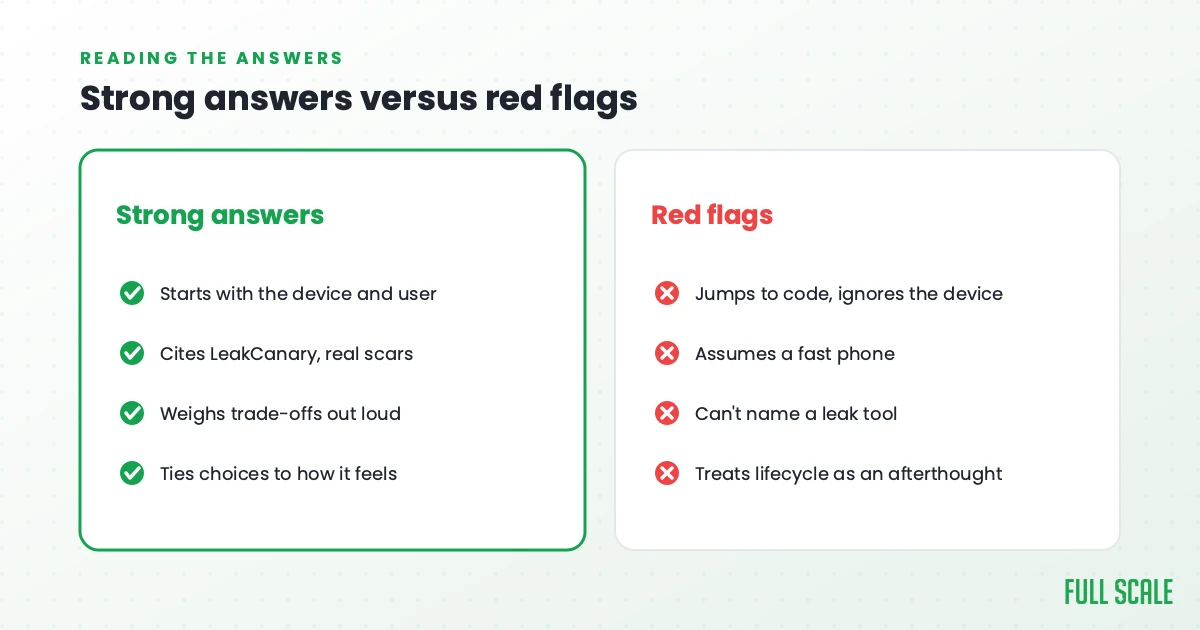
Strong answers start with the device and the user before the syntax. They reference real tools and real scars: a leak LeakCanary finally caught, an ANR that only showed up on certain phones, a crash that came down to a config change they had not handled. They weigh trade-offs out loud instead of declaring one right answer. And they tie technical choices back to whether the app actually felt good on a real device.
Red flags cluster into a few habits. The candidate jumps to implementation and never mentions the user or the device. They assume a fast phone, plenty of memory, and a strong network that many real users do not have. They cannot name the tools they would use to find a leak or an ANR. They treat lifecycle handling as an afterthought. And they hand back AI output as finished work rather than a draft to review. None of those are about syntax, which is exactly the point.
How we vet Android developers at Full Scale
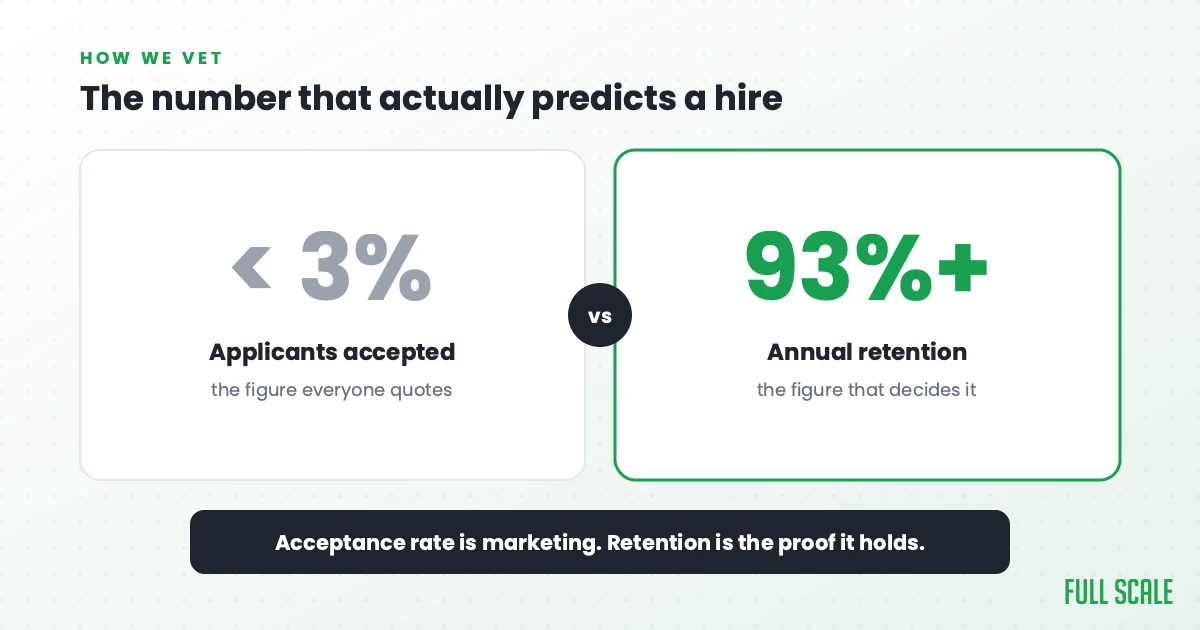
Our screening is built on exactly this, because we put our name behind every developer we place. The technical round is real architecture and debugging work, the kind of problem a real device actually hands you, not a syntax quiz. Around it we check communication, English fluency, work ethic, and how someone operates on a distributed team, with background checks thorough enough that we have interviewed candidates’ neighbors. Fewer than 3% make it through. The full process is in our guide to interviewing a software engineer.
I am wary of that 3% number, though, because an acceptance rate is the easiest thing in this business to dress up as marketing, and it is not what makes a hire succeed. What does is whether the developer stays long enough to learn your product and become part of the team. So the number I trust is retention, and ours runs over 93%, going back to 2018. A selective filter only matters if the people who clear it stay.
It is also why we staff integrated teams rather than run a body shop. The engineers we place at AMC Theatres sit in the standups and the roadmap conversations next to AMC’s own staff, not behind a vendor account manager. That is staff augmentation the way it should work, and it only pays off when you hire for judgment and keep people long enough for that judgment to compound.
If you want the longer version of how we think about Android specifically, our guide to offshore Android app development covers the engagement model and the cost math, and you can see the full scope of our Android application development services. And if you would rather skip the interviewing and start with developers who have already cleared this bar, you can hire Android developers through us directly.
It comes down to this. The facts are free now, so stop grading people on them. Grade them on the judgment that decides whether your app feels solid in a user’s hand or gets deleted after one frustrating session on a slow phone. That is what the questions above are built to surface.
Building cross-platform instead? See our Flutter developer interview questions guide.
Frequently asked questions
Are technical Android questions like the Activity lifecycle and Parcelable useless now?
The knowledge is not useless. A developer still needs to understand the lifecycle, configuration changes, and how Android manages processes to debug real problems. What changed is that those topics no longer work as *screening* questions, because any candidate can recite a clean answer in seconds. Use them as a way into a real debugging story instead of as a recall test.
What should I ask an Android developer instead of coding trivia?
Ask open-ended questions that reveal judgment: how they would refactor a god-object Activity, how they would keep state through a configuration change or process death, how they would close the gap between a flagship and a cheap device, and how they would diagnose an ANR. Then drill into the reasoning with follow-ups.
What prevents a candidate from using AI to answer these?
You do not block it, you make it useless in the moment. Open-ended judgment questions hold up in a live setting because the follow-ups expose a piped answer fast. Ask them to walk through a real decision they made, hand them an AI-generated screen to critique, and chase the reasoning rather than the conclusion.
What is the difference between a senior and a junior Android developer in the AI era?
Both can generate working Kotlin with AI. The senior knows which generated code to trust, what survives the OS reclaiming the process, how the app behaves on a cheap device, and whether the screen should ship at all. The value moved from writing the code to judging it.
Want a team that has already passed these questions? Book a call and we will walk you through who we would put on your Android work.