AI Proof Interview Questions for Flutter Developers

In this article
One codebase ships to both app stores, and then iOS users rate it a full star lower than Android users and nobody can say why. That gap, between writing Dart that compiles everywhere and building an app that feels right on each platform, is exactly what a Flutter interview should expose. Most Flutter developer interview questions never get near it. They test definitions, and the day your candidate started using AI, definitions stopped telling you anything.
Look at the usual list. What is the difference between a StatelessWidget and a StatefulWidget. What is a BuildContext. Explain the widget lifecycle. What does a key do. How does hot reload work. What is the difference between main and the widget tree. For years those were the standard Flutter screen, and they made sense when the only place to find the answer was inside a developer’s own head.
Not anymore. A candidate with a chat assistant in the next tab returns every one of those in seconds, and explains them well. The knowledge still matters, you cannot reason about a rebuild storm or a jank problem without it, but it has stopped being something you can *screen* on. A clean answer no longer reveals whether the person earned it shipping real apps or read it off a screen a moment ago. A fluent recital used to be a fair sign of experience. AI made it a coin flip.
The work underneath moved too. AI now writes the widgets, the boilerplate layouts, the routine state plumbing that used to fill a morning, which pushes the scarce part of the job up a level. A senior Flutter developer is not worth more for typing faster. The worth is in the judgment: knowing why the widget tree rebuilds more than it should, where the jank is coming from, when one codebase has to bend to each platform, and whether the screen should be built the way the ticket reads at all. The developers who only produce code are the ones AI replaces. The ones who can reason about an app running on two platforms are the ones who end up leading.
So the questions have to follow the job. I have watched this play out up close. One of our clients, AMC Theatres, had an aging mobile app that a Full Scale engineer quietly rebuilt in Flutter on nights and weekends, and it shipped in a few months when the original estimate was measured in years. That only happens when the developer has the judgment to know what Flutter buys you and what it costs. At Full Scale we vet every Flutter developer on that kind of judgment, not on syntax quizzes, before they ever join a client team. This is the question set we use to find the ones who think. If you are hiring native instead, our companion guides to iOS developer interview questions and Android developer interview questions cover those platforms; this one is about Flutter.
Why widget trivia stopped proving experience
The trivia rested on one assumption: that recall stood in for skill. If you could explain StatelessWidget versus StatefulWidget, you had probably built enough in Flutter to have used both for real. Recall was a shortcut to the real thing.
AI removed the shortcut. A developer who has never shipped an app can now explain BuildContext and the widget lifecycle as fluently as someone who spent a week chasing a frame-rate drop. You are not measuring what you think you are measuring. The trivia is not useless to *know*. It is useless to *test*, because everyone passes and the pass tells you nothing.
What is left is the work AI cannot do for you. A model will generate a widget and a state class in seconds. It will not tell you that the missing const makes the subtree rebuild on every frame, that setState is rebuilding the whole screen when it should rebuild a corner, or that the screen does not need to exist. Those are judgment calls, and judgment is what a senior hire is for.
Watch for the trap here. When the syntax is free, the cheapest developer who can pass the puzzle looks like the obvious hire, and Flutter makes it tempting because one person seems to cover two platforms. That is the mistake I named cheapshoring: chasing the lowest rate and treating engineers as interchangeable people who type Dart. It was a weak bet before and a worse one now, because the cheap part is what AI already does for free. The corner a cheap Flutter hire cuts shows up as jank on a mid-range phone and an app that feels foreign on one of the two platforms, and users feel both.
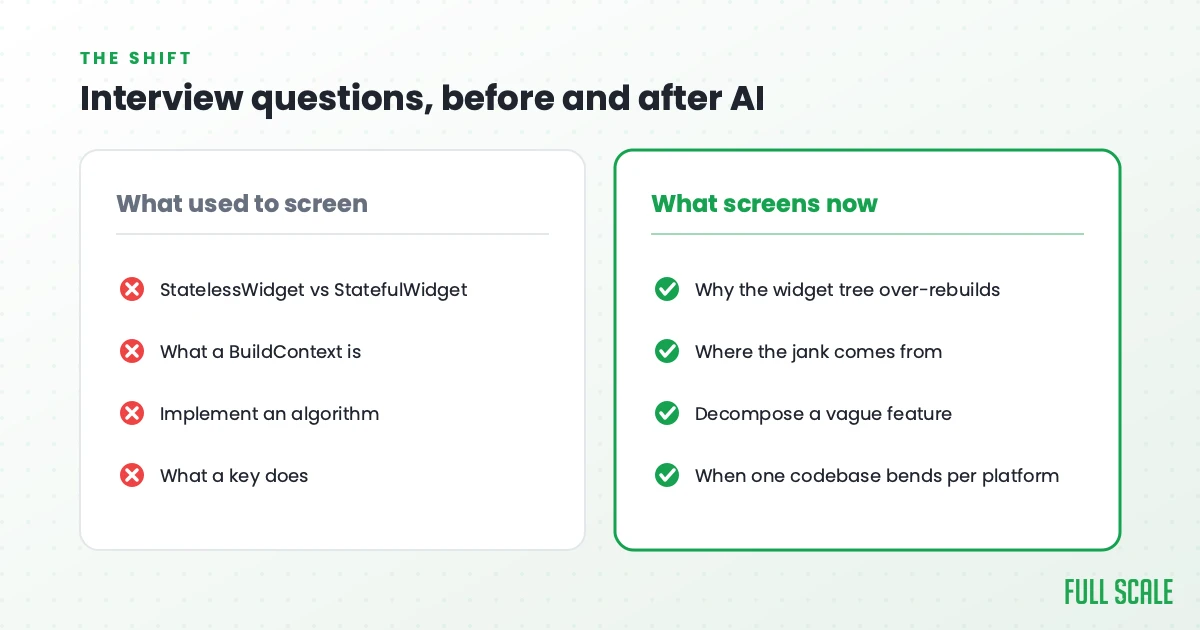
Here is the shift in Flutter terms:
| What the old questions tested | Why it no longer screens | What to test instead |
|---|---|---|
Reciting StatelessWidget versus StatefulWidget | AI answers it instantly; everyone passes | Why the widget tree rebuilds far more than it should |
What a BuildContext is | Free to look up; can’t tell who has shipped | Where the jank comes from, and how they find it |
| Implement an algorithm on a whiteboard | AI writes it; the job is rarely this | How they break down a vague, underspecified feature |
What a key does | AI fills it in | When one codebase has to bend to each platform |
What to screen Flutter developers for now
If recall no longer screens, what replaces it? Five things, and they line up with the five groups of questions below.
Widget-tree and state judgment. Whether they can defend a design and name its cost. Writing Dart is not the same as knowing Flutter. Anyone who finished a tutorial can compose a widget. Building a Flutter app that holds up means reasoning about how and when the widget tree rebuilds, about where const and keys cut needless work, and about which state-management approach earns its weight, from plain setState to Provider, Riverpod, or Bloc. That is the knowledge a memorized definition only pretends to cover.
Problem-solving on open-ended messes. Real Flutter work rarely arrives as a clean spec. It arrives as “the list janks when you scroll” or “it feels wrong on iOS but fine on Android.” You want to watch how they cut an ambiguous problem into parts, and whether they ask what you are really trying to build before they start.
Performance and production reality. A Flutter app can run at a smooth 60 frames on a flagship and stutter on a mid-range device, usually because the build method does too much or the tree rebuilds when it should not. Senior judgment is anticipating that, profiling the UI and raster threads, and designing around it before users feel it.
Cross-platform and platform-integration judgment. The whole promise of Flutter is one codebase for two platforms, and the whole risk is where that promise leaks. The strongest developers know when to reach for a platform channel, when a screen should adapt between Material and Cupertino, and where iOS and Android genuinely behave differently. The official Flutter documentation should be a reference they actually use, not something they skimmed once.
Curiosity and working with AI. When anyone can generate a widget, the developer who asks “should this exist, and what problem does it solve” is worth more than the one who silently builds the ticket. The same goes for AI output: you want someone who treats it as a draft to review and steer, the way a lead reviews a junior’s pull request.
Under all five sit the three traits we screen hardest for on every stack: communication, curiosity, and courage. Communication is whether they can explain why they pulled state out of a giant widget. Curiosity is whether they are genuinely adapting to how AI changed the craft. Courage is whether they will flag a screen that feels wrong on one platform instead of shipping it anyway. We wrote the long version in our book on engineering leadership, and it holds up especially well in Flutter, where one team owns the experience on two unforgiving platforms at once.
The AI-proof Flutter developer interview questions
A fair objection first: cannot AI just answer these too? It can. Paste any one into a chat window and a clean response comes back. That is not the point. These hold up in a live interview because the format defeats the paste, not the question. Drill into the *why* with a follow-up, ask them to walk through a real decision on a real app, throw a curveball, and a piped answer falls apart on the second turn while a real one only sharpens. So ask these, then chase the reasoning.
Widget-tree and state judgment
1. Pick a Flutter app you have actually shipped and tell me one architecture decision you would make differently now. A rehearsed answer falls apart the moment you ask why, so chase it. It shows whether they look at their own apps critically and whether their opinions came from shipping or from a tutorial.
2. You inherit a Flutter app where one giant widget holds all the state and rebuilds the whole screen on every change. How do you decide what to pull apart first? Strong answers weigh risk against value and reach for narrowing the rebuild scope before adopting a heavy state library. The weaker instinct is to rewrite it all around whatever pattern they read about last.
3. When would you not reach for Bloc or Riverpod, or not split a widget further? This catches developers who add structure by reflex. Knowing when plain setState is the right call, and what a state library actually costs in ceremony, is a senior signal.
Working a problem on a real device
4. A list janks when the user scrolls it, but only sometimes. How do you figure out what is happening? This separates the developers who think about rebuild scope, expensive build methods, missing const, and image decoding from the ones who guess and start deleting widgets.
5. A feature request lands as one vague sentence from the CEO. What do you do before you write any code? The answer you want is full of questions, not assumptions. The developer who clarifies the problem builds the right thing. The one who guesses builds the wrong thing fast.
6. Design a screen that loads remote data, caches it locally, and updates the UI as it arrives without rebuilding the whole tree. Talk me through it. Listen for where the state lives, how they scope rebuilds to the widgets that changed, what the user sees while data loads, and how a refresh stays smooth. This is where naive Flutter rebuilds everything and stutters.
Holding 60 frames on real devices
7. Your app runs at a smooth 60 frames on a flagship but drops frames during animation on a mid-range device. Walk me through how you would find the jank. You want them to reach for the Flutter DevTools performance overlay, tell a UI-thread problem from a raster-thread one, check rebuild counts, and fix the actual cause. Tool fluency shows up here on its own.
8. The same codebase behaves differently on iOS and Android even though you wrote it once. How do you handle that? This is the Flutter signature, and a weak answer pretends one codebase means identical behavior. A strong one talks about platform channels, adaptive widgets, and the places where iOS and Android genuinely differ and should.
9. Your crash rate jumps after an OS update, but only on certain devices. Walk me through your investigation. You want a systematic approach: read the Crashlytics stack traces, isolate by platform and device, reproduce, then ship a fix. Watch whether they reason from evidence or from a guess.
Cross-platform and platform-integration judgment
10. A design has to feel native on both iOS and Android from one codebase. How do you pull that off without forking the whole app? A senior Flutter developer talks about Material and Cupertino widgets, adaptive components, respecting each platform’s conventions, and sharing the logic while letting the surface differ. Knowing where to share and where to split is the whole point.
11. Your one codebase ships to both stores, but iOS users rate it lower than Android users. Why might that happen, and what would you do about it? This is the thesis in one question. It reveals whether they understand that “it runs on both” is not “it feels right on both,” and that closing that gap is platform judgment, not a framework feature.
Curiosity, and what AI gets wrong
12. How has AI changed the way you build Flutter day to day, and where do you not trust it? This is the easiest trait to test and the hardest to fake. A genuinely curious developer lights up and gets specific. The “where do you not trust it” half matters most. Veracode’s 2025 GenAI Code Security Report found that 45% of AI-generated code samples introduced a known security flaw, so a developer who reviews the output, catches the missing const and the setState that rebuilds the whole tree, and steers it is worth far more than one who pastes it and hopes.
The strongest version of this question is to stop asking and start watching. Hand them a widget an AI generated and ask what they would change before it ships. The developer who spots the missing const constructors, the setState rebuilding far too much, the missing keys on a list, and the total lack of platform adaptation is showing you the exact judgment the job now rewards. The one who says “looks good” is showing you something too.
What a strong Flutter answer reveals
These Flutter interview questions only work if you know what you are listening for.
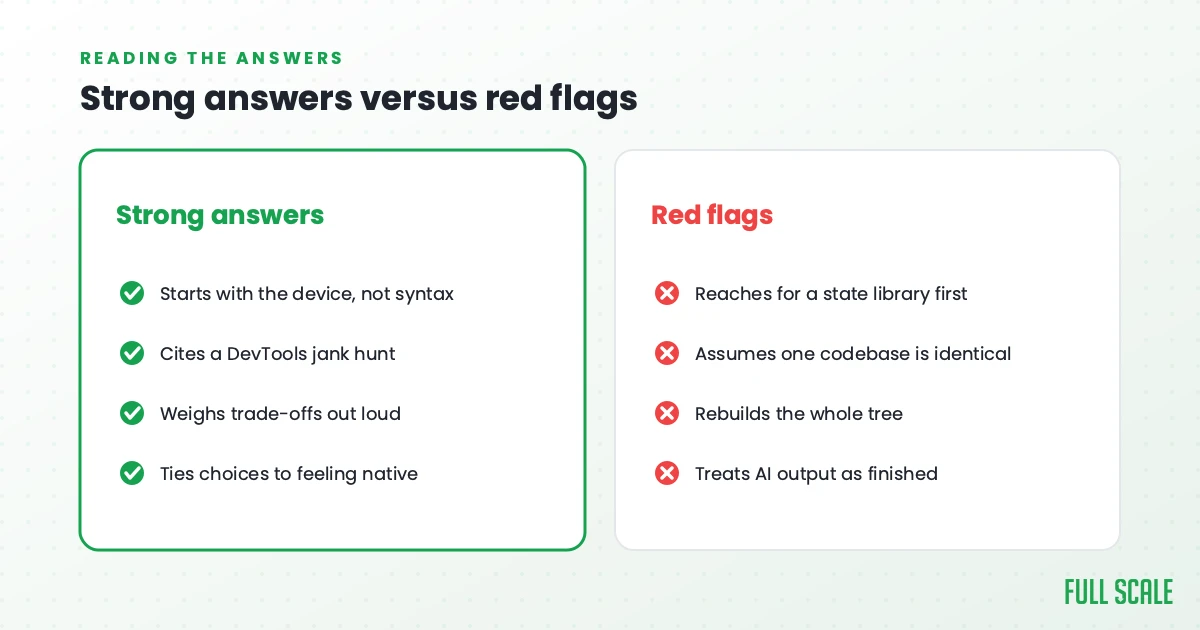
Strong answers start with how the app behaves on a real device before the syntax. They reference real tools and real scars: a DevTools session that found the raster-thread jank, a rebuild they finally scoped down, a screen they made feel native on both platforms. They weigh trade-offs out loud instead of declaring one right answer. And they connect technical choices back to whether the app actually felt smooth and at home on each platform.
Red flags cluster into a few habits. The candidate reaches for a state library before they understand the problem. They assume one codebase means identical behavior on both platforms. They rebuild the whole tree without seeing the cost. They cannot name the tools they would use to find jank. And they hand back AI output as finished work rather than a draft to review. None of those are about syntax, which is exactly the point.
How Full Scale screens Flutter developers
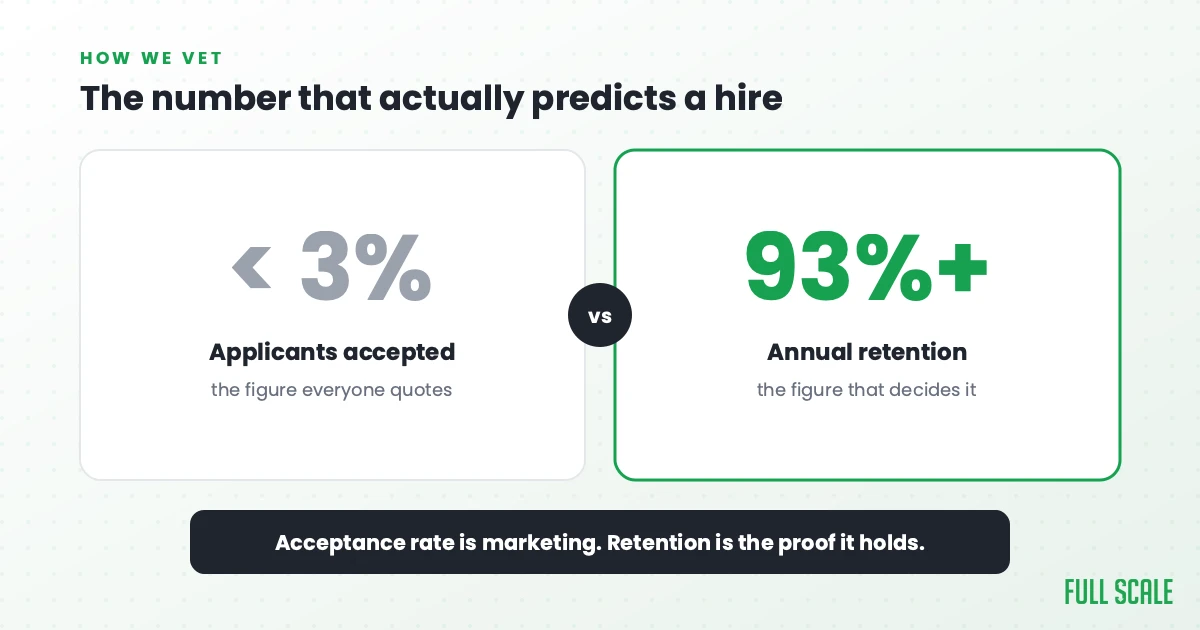
Our screening is built on exactly this, because we put our name behind every developer we place. The technical round is real architecture and performance work, the kind a cross-platform app actually produces, not a syntax quiz. Around it we check communication, English fluency, work ethic, and how someone operates on a distributed team, with background checks thorough enough that we have interviewed candidates’ neighbors. Fewer than 3% make it through. The full process is in our guide to interviewing a software engineer.
I am wary of that 3% number, though, because an acceptance rate is the easiest thing in this business to dress up as marketing, and it is not what makes a hire succeed. What does is whether the developer stays long enough to learn your product and become part of the team. So the number I trust is retention, and ours runs over 93%, going back to 2018. A selective filter only matters if the people who clear it stay.
It is also why we staff integrated teams rather than run a body shop. The Flutter rebuild that shipped in months for AMC Theatres happened because the engineer sat in the standups and the roadmap conversations next to AMC’s own staff, not behind a vendor account manager. That is staff augmentation the way it should work, and it only pays off when you hire for judgment and keep people long enough for that judgment to compound.
If you want the longer version of how we think about Flutter and mobile specifically, you can see the full scope of our Flutter app development services. And if you would rather skip the interviewing and start with developers who have already cleared this bar, you can hire Flutter developers through us directly.
It comes down to this. The facts are free now, so stop grading people on them. Grade them on the judgment that decides whether your app feels smooth and native on both platforms or janky and foreign on one. That is what the questions above are built to surface.
Frequently asked questions
Are technical Flutter questions like StatelessWidget versus StatefulWidget useless now?
The knowledge is not useless. A developer still needs to understand widgets, BuildContext, and how the rebuild cycle works to debug real problems. What changed is that those topics no longer work as *screening* questions, because any candidate can recite a clean answer in seconds. Use them as a way into a real debugging story instead of as a recall test.
What should I ask a Flutter developer instead of coding trivia?
Ask open-ended questions that reveal judgment: how they would narrow the rebuild scope of a giant widget, when they would not reach for Bloc or Riverpod, how they would find jank on a mid-range device, and how they would make one codebase feel native on both iOS and Android. Then drill into the reasoning with follow-ups.
How do I stop a candidate from using AI to answer in a Flutter interview?
You do not block it, you make it pointless. In a live conversation, follow-up questions surface a pasted answer almost at once. Ask the candidate to walk through a real decision from their own work, hand them an AI-generated widget and ask what they would change before it ships, and stay on the reasoning instead of the answer.
What is the difference between a senior and a junior Flutter developer in the AI era?
Both can generate working Flutter with AI. The senior knows which generated code to trust, why the widget tree rebuilds too much, where the jank lives, and when one codebase has to bend to each platform. The value moved from writing the code to judging it.
Want a team that has already passed these questions? Book a call and we will walk you through who we would put on your Flutter work.