Desktop Application Development in 2026: When You Still Need It

In this article
- What desktop application development actually means in 2026
- Why most software left the desktop (and why I did too)
- When desktop still wins
- A lot of “desktop apps” are really web apps in a window
- How to choose a desktop framework without overthinking it
- Who should build it (and the cheap-developer trap)
- What I’d tell you before you build
- Frequently asked questions
Quick Answer: Desktop application development is building software that installs and runs directly on a computer’s operating system, like Windows, macOS, or Linux, instead of in a web browser. In 2026 it still wins for a specific set of jobs: heavy performance, offline use, deep hardware or operating-system access, and tight security. For most other software, a web app is the better call. The decision comes before the code, and Full Scale staffs the .NET and C# engineers who get that decision right when desktop is the answer.
I started my career writing desktop apps in Visual Basic 6.
This was Windows software you installed off a disc, the kind that put a window on your screen and talked directly to the machine. Then the web happened. I watched almost the entire industry move into the browser, and I moved with it. The CRM I co-founded, VinSolutions, was a web application, not a desktop one. Stackify, the developer tools company I built next, lived in the cloud.
So when a founder asks me about desktop application development today, my honest first question is whether they need a desktop app at all.
Sometimes the answer is a clear yes. Desktop is still the right call for a real category of software, and picking it for the wrong reasons (or against it for the wrong reasons) costs you months. The expensive mistake isn’t the framework you pick. It’s deciding to build for the desktop when you didn’t need to, or skipping it when you did.
This is a field guide to that decision: what desktop development actually is in 2026, when it still beats the browser, how to choose how you build, and who should build it.
What desktop application development actually means in 2026
Desktop application development is the work of building software that installs on and runs natively on a computer’s operating system. It runs on the machine itself, not on a server you reach through a browser tab.
That’s the line that matters. A web app lives on a server and renders in Chrome or Safari. A desktop app is installed locally and can use the full machine, the file system, the processor, connected hardware, and the operating system’s own features.
The categories blur more than they used to. A lot of software you think of as desktop, like Slack or VS Code, is actually web technology wrapped in a desktop shell. We’ll get to why that matters. For now, the useful distinction is simple: a desktop app runs on the user’s machine, a web app runs on someone else’s.
The languages and tools split along the same lines. Windows desktop work is mostly C# and .NET. macOS is Swift. Cross-platform work uses frameworks that let one codebase target several operating systems, which is where most new desktop projects start the tech stack conversation.
Why most software left the desktop (and why I did too)
When I was writing VB6 apps, shipping software meant burning a release, getting it onto a customer’s machine, and praying their setup matched yours. Every update was a redistribution problem. Every operating system was a separate build. A bug fix could take weeks to reach users.
The browser solved all of that at once.
With a web app, you deploy once and every user has the new version instantly. There’s nothing to install. It runs the same on Windows, Mac, and a Chromebook. For most business software, that was the whole game, and it’s why VinSolutions was web-based from the start. Car dealers didn’t want to install anything. They wanted to log in.
That trade is still real in 2026. The browser wins on distribution, instant updates, and reach, and for the majority of business software those three things outweigh everything desktop offers.
So most software left the desktop for good reasons. The mistake is assuming that means all software should.
When desktop still wins
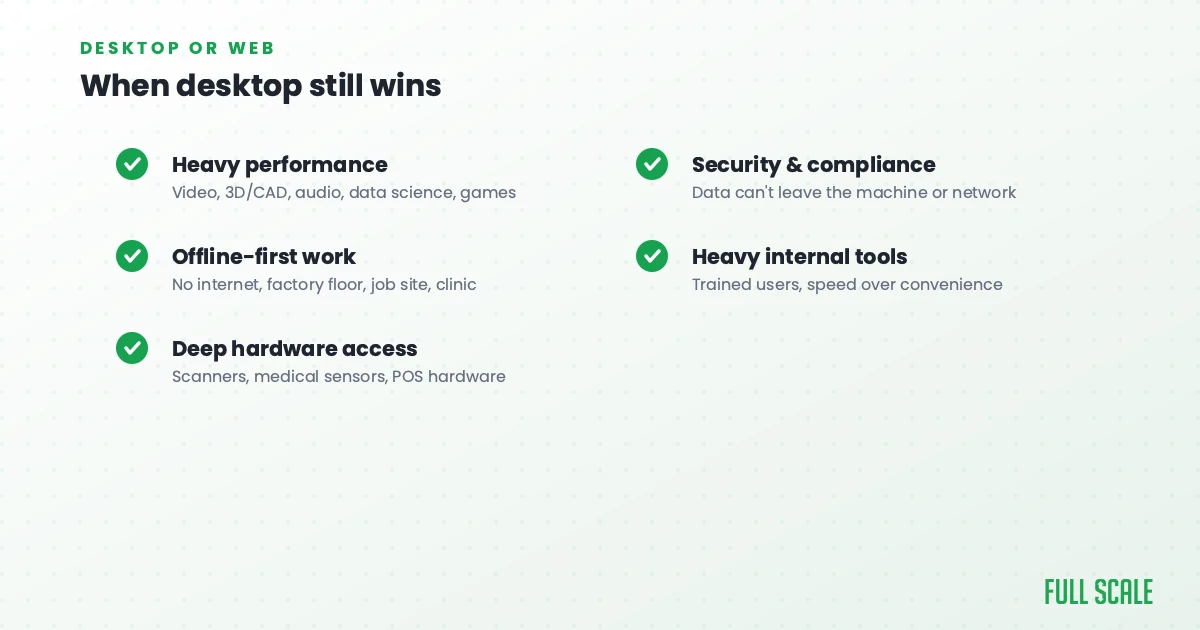
Desktop hasn’t gone away, it’s gotten more specific. There’s a clear set of jobs where installing on the machine still beats running in a tab, and they share a theme: the software needs something the browser can’t reliably give it.
Here’s where desktop still earns it:
- Heavy performance and local compute. Video editing, 3D and CAD, audio production, data science, game development. For browser-based Clideo website tools, you can handle many video editing tasks without installing resource-heavy software, while applications that need the GPU, lots of memory, or direct processor access may still run better outside a sandboxed browser tab.
- Offline-first work. If the software has to keep working with no internet, on a factory floor, a job site, a plane, or a clinic with bad connectivity, local is the answer.
- Deep hardware and operating-system access. Apps that drive specialized peripherals, scanners, medical imaging sensors, point-of-sale hardware, or that need low-level OS integration. The browser deliberately walls this off; the desktop doesn’t.
- Security and regulated environments. When data can’t leave the machine or the local network for compliance reasons, a desktop app keeps everything local by design.
- Heavy-duty internal tools. Software a small group of trained employees uses all day, where raw speed and capability matter more than zero-install convenience.
Plenty of serious software still lives here. The industries that lean on desktop are the ones where performance and specialized functionality are non-negotiable: engineering, design, finance, healthcare, and creative tools.
If your software needs one of those things, desktop isn’t legacy. It’s the right tool. If it needs none of them, keep reading.
A lot of “desktop apps” are really web apps in a window
Here’s the part the agency guides selling you a desktop build won’t say.
A large share of “we need a desktop app” requests are really web apps that someone wants to live in a window with an icon. The give-away is that the actual requirements are all things a browser does fine: forms, dashboards, records, reports, a login.
This matters because of how modern desktop frameworks work. Tools like Electron, the framework behind Slack and VS Code, package a web app with a bundled browser engine so it runs like a desktop program. Under the hood, it’s the same web technology. You’re building a web app and shipping it in a desktop costume.
Sometimes that costume is worth it. An icon in the dock, system notifications, and an offline mode are real features. But if the only reason you want desktop is that it “feels more serious,” you’re about to spend more to build and maintain something a web app would have done cheaper and reached more people.
Before you commit, do what you’d do with any product assumption. Strip it down to the smallest thing that proves the need, the same discipline a good minimum viable product forces. Ask what the software has to do that a browser genuinely can’t. If you can’t name it, you probably want a web app.
How to choose a desktop framework without overthinking it
Once you actually need desktop, the next decision is how to build it: one native app per operating system, or one cross-platform codebase that targets all of them. For most teams, cross-platform is the starting point, because maintaining separate native apps for Windows, Mac, and Linux is expensive.
The good news is the choice in 2026 comes down to a handful of mature options. Here’s how the main ones compare.
| Framework | Built on | Best when |
|---|---|---|
| Electron | Web tech (Chromium + Node.js) | Your team already builds for the web and you want the most mature, proven runtime |
| Tauri | Web frontend + Rust, native OS webview | App size, memory use, and a smaller security surface matter |
| .NET MAUI | C# / .NET | Your team lives in the Microsoft stack and targets Windows first |
| Qt | C++ / QML | You need true native widgets, device support, or industrial-grade performance |
| Flutter | Dart | One UI codebase should span mobile and desktop together |
Don’t agonize over this. The best framework is almost always the one your team can move fastest in, not the one that wins a benchmark. If your engineers know web technology, Electron or Tauri is the path. If they’re a Microsoft shop, .NET MAUI. If you need native performance and hardware control, Qt.
My rule from twenty years of building software still applies here: never introduce complexity unless it gives you a 5x improvement or there’s truly no other way. Tauri ships smaller, leaner apps than Electron, which is a genuine advantage. But if your team knows Electron and the size doesn’t hurt you, the “better” framework that nobody on your team has shipped is the slower choice.
Who should build it (and the cheap-developer trap)
Desktop development, especially on Windows, is overwhelmingly a C# and .NET world, with native macOS work in Swift and cross-platform work in the frameworks above. That’s a more specialized skill set than generic web development, and it’s getting harder to staff as fewer new engineers start on the desktop.
This is where the temptation to hire cheap does the most damage.
The instinct on any build is to find the lowest hourly rate that can write the code. I call this cheapshoring, optimizing for the rate instead of whether the work is actually good. On desktop it bites harder than usual, because desktop bugs ship to the user’s machine. A web bug you fix once on the server. A desktop bug is already installed on ten thousand computers, and a cheap developer who doesn’t understand memory, performance, or the operating system will hand you exactly that kind of bug.
What you want is experienced engineers in the right stack who treat your product like their own, not a project they’re closing out. Full Scale builds dedicated teams on that model. Our .NET and C# engineers work with clients like AMC Theatres and SOTA Cloud, the same stack that runs most serious Windows software.
The model that works for desktop is the one that works for any ongoing software: staff augmentation over project outsourcing. You hire dedicated developers who work as part of your team, under your direction, long term, instead of handing a spec to an agency that delivers a black box and disappears.
For most companies, that path runs offshore. Done right, offshore .NET development gives you senior, desktop-capable engineers without the local price tag. Software that installs on your customers’ machines is not something you want to lose ownership of the moment the contract ends.
What I’d tell you before you build
Desktop application development isn’t dead, and it was never a default. It solves a specific set of problems, and the trick is being honest about whether you have one of them.
Start with the decision, not the code. If your software needs real performance, offline capability, hardware access, or hard security, build for the desktop and don’t apologize for it. If it needs none of those, a web app will cost less, ship faster, and reach more people. And if you do build desktop, pick the framework your team can move fastest in and staff it with people who actually know the stack.
The hard part was never writing the code. It was deciding what to build, which is the whole thesis of my book, Product Driven, and it’s as true for a desktop app as it is for anything else.
Frequently asked questions
What is desktop application development?
Desktop application development is the process of building software that installs and runs directly on a computer’s operating system, such as Windows, macOS, or Linux, rather than in a web browser. These apps run on the local machine and can use its full hardware, file system, and operating-system features.
Is desktop app development still relevant in 2026?
Yes, for the right use cases. Desktop remains the better choice for performance-heavy software, offline-first tools, apps that need deep hardware or operating-system access, and security-sensitive or regulated environments. For most standard business software, a web app is now the more practical option.
Should I build a native or cross-platform desktop app?
Most teams should start cross-platform, because maintaining separate native apps for Windows, Mac, and Linux is expensive. Use a native build when you need maximum performance or deep platform-specific integration on one operating system. Cross-platform frameworks like Electron, Tauri, and .NET MAUI cover the majority of cases.
What language is used for desktop applications?
It depends on the platform. Windows desktop software is mostly C# and .NET, macOS uses Swift, and cross-platform frameworks use web technologies (Electron, Tauri), Dart (Flutter), or C++ (Qt). The right language follows the framework and the platform you’re targeting.
How much does desktop application development cost?
Cost depends on complexity, the number of operating systems you support, and who builds it. The biggest cost driver is supporting multiple platforms natively, which a cross-platform framework reduces. Staffing matters too: experienced engineers cost more per hour but prevent the expensive bugs that cheap desktop development tends to ship. If you’re an early-stage company weighing that spend, the same money-and-focus logic in our guide to software development for startups applies here.
Desktop or web, the decision is worth more than the code that follows it.
If you’re weighing a desktop build and want to talk through whether it’s the right call and how to staff it, schedule a call with Full Scale. We’ll help you figure out what you actually need before you write a line of it.