How We Maintain UX Consistency in Distributed Teams: The Practical Guide We Still Use Today
Your offshore team in Manila just delivered a feature that looks nothing like what your Austin team built last week. Now, you’re here thinking what went wrong and how to fix it. You’re not alone in this dilemma; other CTOs and engineering leaders experience it, too.
UX consistency in distributed teams means maintaining uniform design standards across globally dispersed development groups. Without it, your product becomes a patchwork of different interpretations, confusing users and damaging your brand.
At Full Scale, we’ve helped 60+ companies achieve UX consistency in distributed teams through systematic design implementation.
This guide shows you our proven framework that you can use to start immediately.
What is UX Consistency in Distributed Teams?
Before diving into solutions, let’s clarify what we’re solving. UX consistency in distributed teams ensures all developers create interfaces following the same design principles, regardless of location.
It encompasses visual design, interaction patterns, and code implementation standards. According to Figma’s 2024 Design Systems Report, teams with established design systems ship features 34% faster.
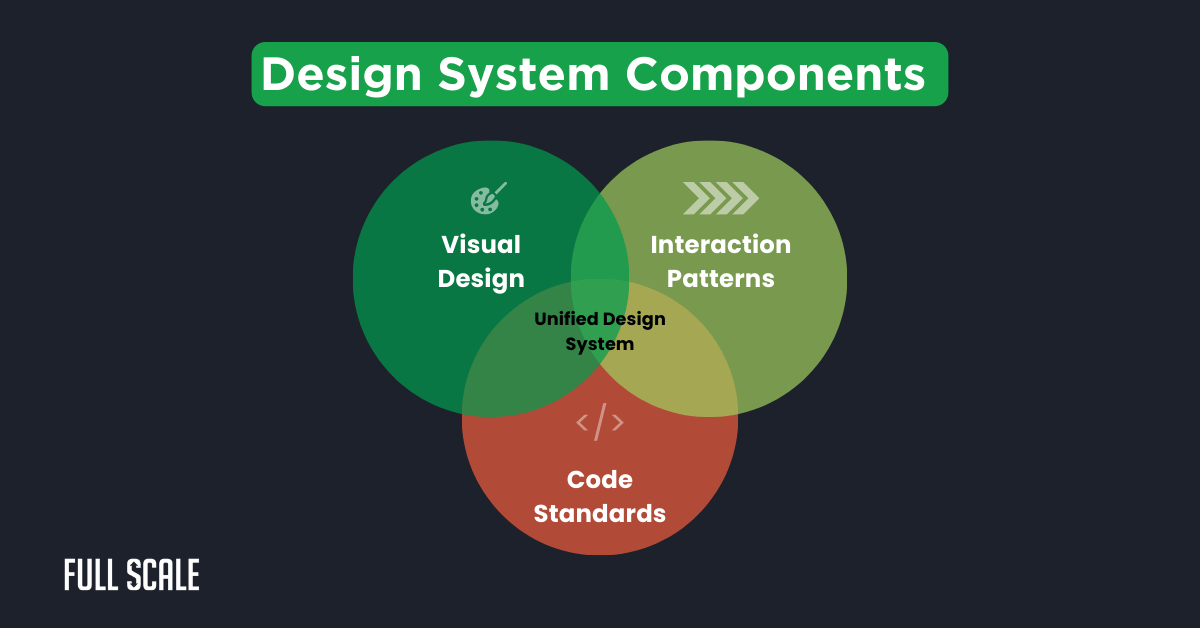
A unified design system brings together visual elements, user interactions, and coding standards. This creates consistent experiences regardless of which team implements features.
The Real Cost of Inconsistent UX
Now that you understand the concept, let’s examine why it matters financially. Design inconsistency costs more than you think.
Netflix reported spending $1.3 million annually on redundant component development before implementing its design system. Brand dilution happens when users encounter different interfaces for similar functions.
Consider this FinTech startup’s experience with poor UX consistency in distributed teams. Three offshore teams created three payment flows, causing user abandonment rates to spike 40%.
5 Critical Challenges of UX Consistency Across Time Zones
These costs stem from specific challenges unique to distributed teams. Managing design standards for offshore developers presents obstacles that co-located teams never face.
1. Asynchronous Design Reviews
Your designer in New York finishes mockups at 5 PM. Your Philippines team starts work at that exact moment, proceeding without clarification.
2. Design Intent Lost in Translation
Cultural contexts influence design interpretation differently across regions. What seems obvious in one location might be confusing in another.
3. Tool Fragmentation
Different teams often prefer different design tools based on regional preferences. This creates version control nightmares and inconsistent implementations across your product.
4. Documentation Decay
Design specs become outdated quickly when teams work around the clock. Teams working overnight might reference old versions without realizing changes occurred.
5. Local “Improvements”
Developers make well-intentioned changes without approval to “improve” designs. These modifications accumulate into significant deviations from your original vision.
The Design System Solution: Your Single Source of Truth
Fortunately, these challenges have a proven solution. A comprehensive design system for global development eliminates confusion by providing one authoritative reference.
Every team member accesses the same components, patterns, and guidelines. Let’s calculate what this means for your bottom line.
UX Consistency Calculator
Calculate potential savings from implementing a design system for your distributed teams:
This calculator estimates savings from reducing duplicate UI development work. Most teams see a 70% reduction in redundant efforts after implementing design systems.
Core Components of an Effective Global Design System
Building on those potential savings, let’s explore what makes a design system effective. Your system needs four essential elements to ensure UX consistency in distributed teams.
First, create a component library with pre-built UI elements and detailed specifications. Second, implement design tokens as variables for colors, spacing, and typography.
| Token Type | Purpose | Example |
| Color | Brand consistency | primary-green: #009c4e |
| Spacing | Layout uniformity | spacing-lg: 24px |
| Typography | Text hierarchy | heading-1: 32px bold |
| State | Interactive feedback | hover-state: #a1ce5e |
| Error | User guidance | error-red: #f15e3e |
Design tokens create a shared language between designers and developers. They eliminate ambiguity in implementation across different time zones.
Implementation Across Time Zones
With core components defined, consider the unique needs of global teams. Successful distributed team design systems require special protocols for asynchronous collaboration.
At Full Scale, we’ve developed specific approaches for maintaining UX consistency in distributed teams:
- Git-based design system management enables asynchronous updates
- Automated UI testing catches inconsistencies before deployment
- Synchronized release cycles keep all teams on the same version
- Clear escalation paths handle design questions across time zones
Step-by-Step Implementation Guide
Now let’s transform theory into action with our proven implementation process. Creating UX alignment for global teams requires systematic execution over eight weeks.
Phase 1: Audit and Baseline (Week 1-2)
Start by documenting existing UI patterns across all teams. This establishes your baseline for achieving UX consistency in distributed teams.
Key activities include screenshotting every unique component variation in production. Create a spreadsheet categorizing components by frequency and identify inconsistencies between implementations.
Phase 2: Design System Setup (Week 3-4)
With your audit complete, begin building your centralized system. Choose tools that support remote UX workflow and enable real-time collaboration.
Focus on selecting a primary design tool and building 10-15 core components. Establish your design token structure and implement version control systems.
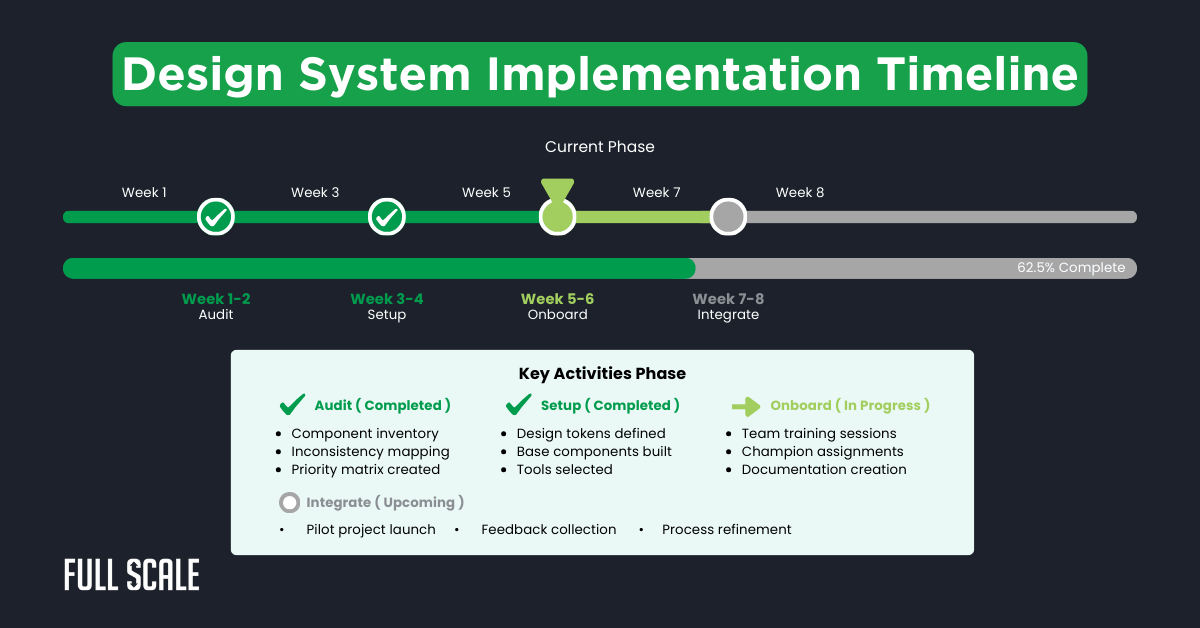
This timeline shows typical implementation phases for global teams. Adjust durations based on your team size and component complexity.
Phase 3: Team Onboarding (Week 5-6)
Your system only works if teams adopt it enthusiastically. Training ensures all teams understand how to maintain UX consistency in distributed teams.
Schedule sessions accommodating all time zones and record everything. Assign design system champions per location and create quick reference guides.
Phase 4: Integration and Testing (Week 7-8)
Finally, validate your system with a real-world application. Launch a pilot project that touches multiple teams to test workflows.
Implement daily design handoffs between time zones for seamless collaboration. Run automated visual regression tests and gather feedback from participating developers.
Tools and Technologies for Global UX Consistency in Distributed Teams
The right tools make or break your implementation success. Modern solutions automate consistency checks that previously required manual review.
Let’s compare the options for maintaining UX consistency in distributed teams:
| Tool | Best For | Time Zone Features | Monthly Cost | Full Scale Recommendation |
| Figma | Real-time collaboration | Live cursors, async comments | $15/editor | ⭐ Recommended |
| Storybook | Component documentation | Static hosting, version control | Free | ⭐ Essential |
| Chromatic | Visual testing | Automated checks, PR integration | $149/month | Optional |
| Sketch + Abstract | Version control | Branch management | $9/user | Alternative |
| Zeplin | Developer handoff | Automatic specs | $8/user | Supplementary |
Development Tools for UX Consistency in Distributed Teams
Beyond design tools, development platforms ensure implementation accuracy. Essential tools include Storybook for interactive component documentation and Chromatic for automated testing.
Communication tools like Loom enable asynchronous design reviews across time zones. Slack with timezone bots coordinates global conversations effectively.
Real-World Success Story: Full Scale Client Achievement
Let’s see these principles in action through a client case study. A growing FinTech startup struggled with UX consistency for distributed teams across continents.
Their payment interface had five button variations and inconsistent error messages. Working with Full Scale, they implemented our design system framework over eight weeks.
Results after six months:
- Design QA issues dropped 60%
- Feature delivery accelerated by 40%
- Design compliance reached 95%
- Customer support tickets decreased 28%
- Developer satisfaction increased from 6.2 to 8.7/10
Common 5 Pitfalls and How to Avoid Them
Learning from others’ mistakes accelerates your success. Many teams stumble when implementing design ops for remote developers due to predictable errors.
Issue 1: Over-Engineering the System
Teams often try documenting every possible component variation upfront. Instead, start with 10-15 core components and expand based on actual usage.
Issue 2: Ignoring Cultural Differences
Assuming design interpretation is universal causes major problems. Include team members from all regions when making design decisions.
Issue 3: Poor Documentation
Written specs alone fail for UX consistency in distributed teams. Invest heavily in visual examples and video walkthroughs for clarity.
Issue 4: Lack of Enforcement
Manual reviews cannot catch every deviation at scale. Implement automated testing to ensure UI standardization across all teams.
Issue 5: No Update Process
Static design systems become outdated quickly without maintenance. Schedule quarterly reviews to incorporate team feedback and evolving needs.
Measuring UX Consistency in Distributed Team Success
You can’t improve what you don’t measure. Track these metrics to validate your brand consistency in offshore development efforts.
Data proves ROI and identifies areas needing attention:
| Metric | Before Design System | After 6 Months | Industry Benchmark |
| Design Compliance | 42% | 91% | 85% |
| Implementation Time | 120 hours | 72 hours | 80 hours |
| UI Bug Reports | 38/month | 19/month | 22/month |
| Code Reusability | 23% | 67% | 60% |
| Developer Satisfaction | 6.2/10 | 8.7/10 | 7.5/10 |
Monitoring Tools and Techniques
Continuous improvement requires ongoing measurement of UX consistency in distributed teams. Use analytics platforms to track UI interaction patterns across regions.
Implement heat mapping tools to identify user confusion points. A/B testing measures the impact of consistency improvements on user behavior.
Transform Your Global UX Today
You now have the knowledge and tools to achieve perfect UX consistency in distributed teams. The next step is choosing the right partner for implementation.
Full Scale’s proven UX Design Services eliminate design chaos while accelerating development. Our systematic methodology has transformed how global teams collaborate.
Why Partner with Full Scale
- 60+ successful implementations of design systems for distributed teams
- A 95% developer retention rate ensures consistent team knowledge
- Direct integration model eliminates middleman communication issues
- Time zone optimization with teams positioned for 24/7 productivity
- Dedicated design system specialists guide your implementation
- Risk-free trial period to validate our approach with your team
Get Started This Week
Use our Design System Starter Template below to begin your transformation.
Design System Starter Template
Build your foundation for UX consistency in distributed teams
Essential UI Components Checklist
Start with these high-impact components for your design system:
Start with 10-15 components maximum. Add more only after these are fully documented and adopted by all teams.
Ready to implement UX consistency in your distributed teams?
Download Complete TemplateSchedule a free consultation to see how Full Scale revolutionizes global development.
Transform Your Distributed Team’s UX
FAQs: UX Consistency in Distributed Teams
How long does it take to implement a design system for distributed teams?
Most teams achieve basic UX consistency in distributed teams within 8 weeks. Full implementation, including all components, typically takes 3-4 months.
The timeline depends on your current inconsistency level and team size. Starting sooner prevents problems from compounding as teams grow.
What’s the minimum team size that benefits from a design system?
Teams with 5+ developers across multiple locations see immediate benefits. However, even smaller teams planning growth should establish standards early.
Achieving UX consistency in distributed teams becomes exponentially harder as teams expand. Prevention costs far less than correction.
How do you handle design system updates across time zones?
Successful updates require structured communication protocols with clear ownership. We recommend scheduled release cycles, typically bi-weekly, with 48-hour notice periods.
Each team assigns a design system champion who ensures smooth transitions. This person coordinates updates and addresses questions locally.
What if our offshore teams use different development frameworks?
Modern design systems support multiple frameworks through platform-agnostic design tokens. Your component library can include implementations for React, Angular, and Vue.
This approach maintains perfect UX consistency in distributed teams regardless of technology. Design tokens translate seamlessly across all platforms.
How much does poor UX consistency actually cost?
Studies show inconsistent UX increases development time by 30-40% through redundant work. Support costs rise 20-25% from user confusion and increased tickets.
Combined with lower user satisfaction, poor consistency costs enterprises millions annually. Investment in design systems typically pays back within six months.
Can we implement a design system gradually while maintaining ongoing development?
Absolutely, gradual implementation often works better than stopping everything. Start with high-impact components used frequently across teams.
Implement new standards in new features while gradually updating existing interfaces. This approach minimizes disruption while building momentum toward full consistency.