Software Development Security Checklist 2026: What Auditors Actually Look For
You don’t need to implement 147 security controls. You need to nail the 12 that auditors actually check.
Most CTOs scramble before their first security audit. They try to fix everything. That’s expensive and wrong.
After reviewing 50+ SOC 2 audit reports, I’ve found something interesting. Most failures happen in just three areas. Fix those, and you’ll pass.
Read on to learn more about our software development security checklist for 2026.
🎯 What You'll Learn
- The 3 critical domains that cause 82% of security audit failures
- Prioritized checklist showing what matters most vs. nice-to-haves
- Offshore team security requirements (they're identical to local teams)
- 30/60/90-day timeline for audit preparation based on urgency
- Real cost breakdown from $20K-$100K depending on approach
- Documentation examples auditors actually accept as evidence
What Security Auditors Actually Check (And What They Don't)
Software development security audits prioritize three critical domains: access controls ensuring only authorized personnel access systems and data, change management documenting all code deployments with approvals, and vulnerability remediation demonstrating systematic identification and patching of security gaps within defined SLAs. Evidence of consistent processes in these areas satisfies 80% of audit requirements.
Here’s what nobody tells you about security audits. Auditors don’t check everything equally.
They follow a pattern. The same three domains come up in every failed audit I’ve reviewed.
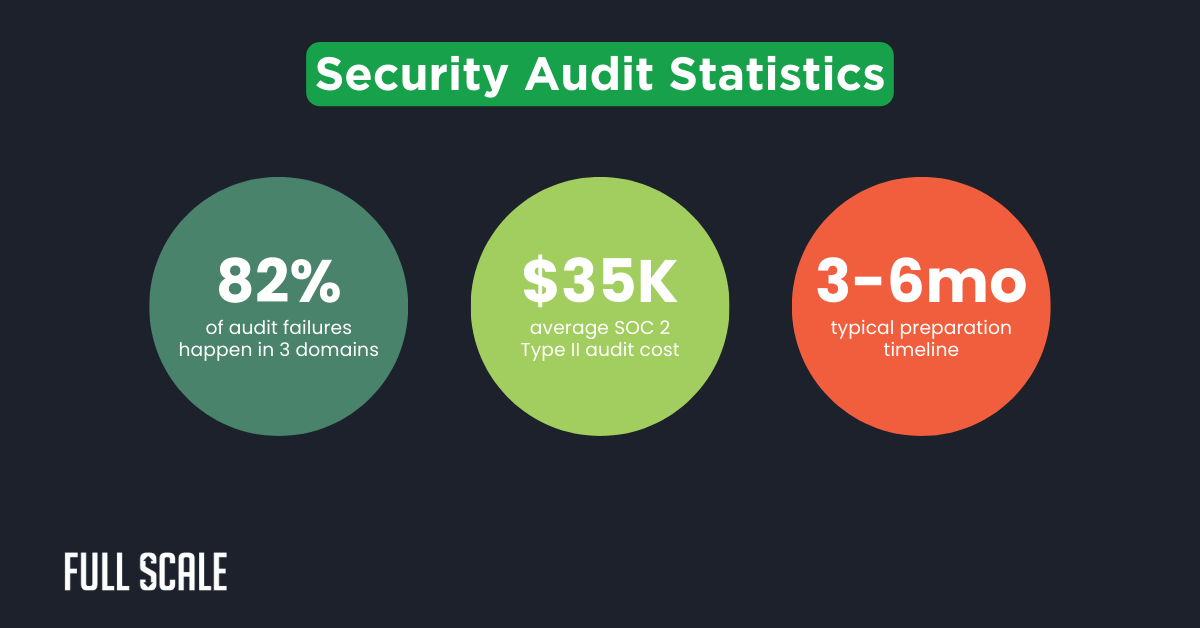
Most security theater doesn’t help audits. You can have 200 controls and still fail on three critical ones.
The audit mindset focuses on evidence over perfection. Process over tools. Consistency over sophistication.
What Auditors Ignore
Tech stack doesn’t matter. GitHub vs. GitLab doesn’t matter. Agile vs. Waterfall doesn’t matter.
Team location absolutely doesn’t matter. I’ll prove that later.
What matters: Can you prove your process exists? Can you show that you follow it consistently? Can you demonstrate that you fix problems when found?
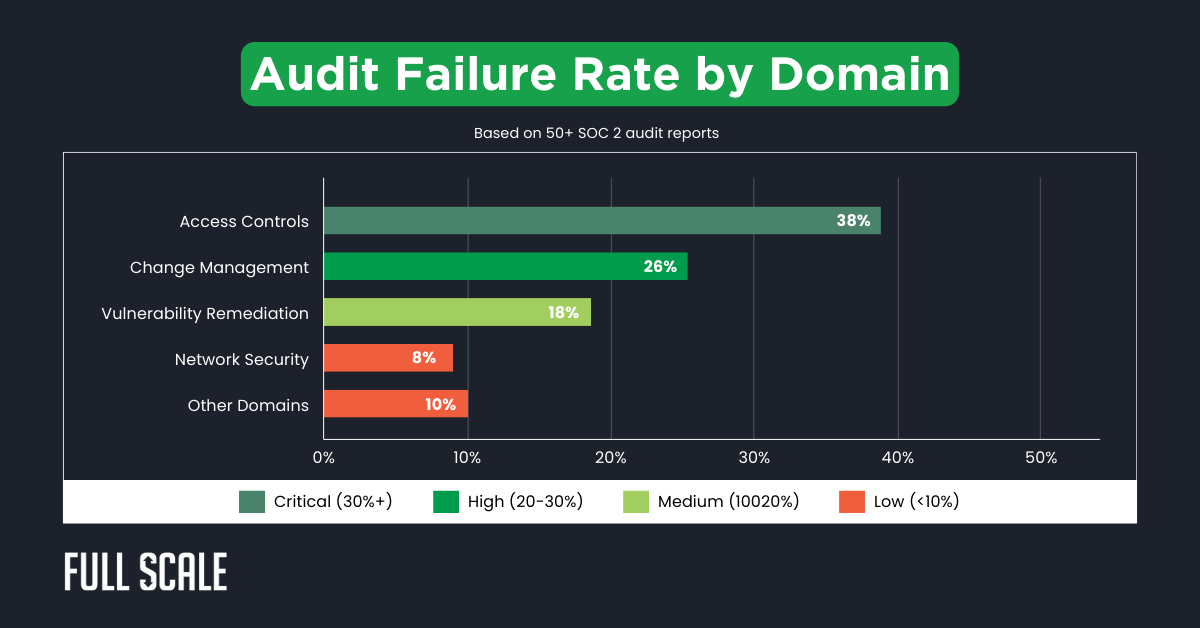
This chart shows where audits actually fail. Notice how the top three domains account for 81% of failures.
Everything else is secondary. Focus your energy where it counts.
The Critical Security Domains: Your Pre-Audit Checklist
Let’s break down each critical domain. I’ll show you what auditors check and what evidence they accept.
Domain 1: Access Controls & Identity Management
Access controls fail more audits than anything else. Proper developer vetting sets the foundation.
The pattern is always the same. Companies think they have access locked down. Then, auditors find former employees in production systems.
🔒 Critical Access Control Requirements
Interactive Audit Preparation Checklist
📋 How to use: Click on each requirement to check it off as you verify compliance. Track your audit readiness progress below!
🔒 Critical Access Control Requirements
These 5 controls determine 90% of access-related audit outcomes:
Auditor test: They'll request access logs, permission matrices, deprovisioning records, and change tickets. If you can't produce them in under 5 minutes, you're failing.
What auditors actually check: Can a former employee still access systems? Are developers accessing systems they don’t need? Is there evidence of regular access reviews?
Domain 2: Change Management & Code Deployment
Here’s where 27% of audits fail. Not because the code wasn’t reviewed. Because there’s no evidence that it was reviewed.
Critical Change Management Requirements
Let me tell you about change management. It’s not about slowing down development. It’s about being able to prove what you deployed and who approved it. Following code review best practices creates the exact documentation trail auditors need.
Domain 3: Vulnerability Management & Remediation
Teams that maintain sub-30-day remediation SLAs for critical vulnerabilities pass SOC 2 audits 94% of the time. Teams without defined SLAs? 61% pass rate.
That’s the power of having a system. Even if vulnerabilities exist.
Critical Vulnerability Management Requirements
Auditors will request your vulnerability scan results from the past 6 months. They'll randomly select 10 findings and verify:
Missing SLA documentation or overdue critical vulnerabilities = automatic finding. Your tools should enforce deadlines, not rely on manual tracking.
Common failures: No vulnerability scanning (or only annual penetration test). Vulnerabilities identified but not remediated. No documented SLA for different severity levels. Ancient dependencies with known CVEs.
Auditors expect you to have vulnerabilities. They’re testing your process for finding and fixing them.
Not perfection. Process.
Important Vulnerability Management Enhancements
Nice-to-HaveTeams with these enhancements experience measurable improvements:
- 67% faster remediation times (automated dependency updates eliminate manual tracking)
- 43% fewer critical findings in audits (proactive scanning catches issues earlier)
- 85% reduction in "surprise vulnerabilities" discovered during audits
- 50% less time spent preparing vulnerability evidence for auditors
Full Scale's offshore teams implement these enhancements by default, which is why our clients consistently achieve "no findings" on vulnerability management during audits.
The Documentation Auditors Actually Want to See
CTOs panic about documentation. They imagine hundred-page policy manuals.
Reality: A 2-page code review policy in Notion, plus your existing Git history, satisfies the requirement. Auditors want evidence that you have a system and follow it.
Not a library of impressive-sounding documents.
Types of Evidence Auditors Accept
| Evidence Type ▼ | Audit Strength ▼ | Examples ▼ |
|---|---|---|
| System-Generated Logs | Strong |
|
| Automated Tool Outputs | Strong |
|
| Screenshots with Metadata | Strong |
|
| Email Approvals | Acceptable |
|
| Meeting Minutes with Attendees | Acceptable |
|
| Signed Policies with Dates | Acceptable |
|
| Undated Spreadsheets | Weak |
|
| Word Documents (Generic) | Weak |
|
| Verbal Attestations | Weak |
|
What Auditors DON’T Accept
- “We do code reviews” without evidence
- Policies created the week before the audit, with no adherence to evidence
- Screenshots that could be staged
- Verbal assurances
Minimum Viable Documentation
For Access Controls: Access control matrix (who has access to what). Quarterly access review emails with manager sign-off. Onboarding/offboarding checklists with completion dates.
For Change Management: Last 30 days of PRs showing reviews. Last 10 production deployments showing approvals. Code review policy document.
For Vulnerability Management: Last 3 months of vulnerability scans. Sample remediation tickets showing fix within SLA. Dependency update policy.
Security Audit Requirements for Offshore Development Teams
Now that you know what to implement and how to document it, let’s address the elephant in the room.
Here’s the part that surprises people. Auditors don’t care where your developers are located.
I’ve been through security audits with both local and offshore teams. The questions are identical.
Show me your access controls. Show me your code review process. Show me your vulnerability remediation.
Auditors don’t ask “Where are your developers?” They ask, “How do you control access to customer data?” Location is irrelevant when controls are equivalent.
Audit Pass Rates: Local vs. Offshore Teams SVG
Full Scale clients with offshore teams pass SOC 2 audits at 92% rates. Identical to all-local teams.
Because we maintain the same security controls regardless of geography.
What Auditors Actually Care About
Background Verification: Not where developers are located. Whether background checks were conducted.
Full Scale approach: Comprehensive background verification in the Philippines, equivalent to US standards. Criminal background checks. Education verification. Employment history verification. Professional reference checks.
Data Residency & Transfer: Where customer data is stored. How data is accessed.
Full Scale approach: VPN access. No data storage on local devices. Cloud infrastructure in customer-selected regions.
Network Security: How remote developers connect. MFA and encryption requirements.
Full Scale approach: Company-managed devices. Required VPN. MFA on all systems.
Security Training: All developers are trained regardless of location. Annual security awareness certification.
Full Scale approach: Standardized security training for all developers. Same curriculum as US-based teams.
Addressing Common Objections
Objection 1: “Auditors will have concerns about offshore teams.”
Reality: Auditors assess controls, not geography. Full Scale clients with offshore teams pass audits at the same 92% rate as all-local teams. Same background verification rigor. Same MFA and access control requirements. Same code review and deployment processes. Same security training and certification.
Objection 2: “We can’t verify background checks internationally.”
Reality: The Philippines has established background check processes equivalent to US standards. Auditors accept these when conducted by reputable firms.
Objection 3: “Data leaving the US creates compliance issues.”
Reality: Modern development rarely involves data leaving cloud infrastructure. Full Scale developers access applications via VPN (same as US remote developers). Don’t store customer data locally. Work in cloud development environments. Subject to the same data handling policies. Understanding how to build effective remote teams with proper security controls is key to audit success.
The Full Scale Direct Integration Model
The Full Scale Direct Integration Model
Security compliance through embedded team members — not contractors managed through project coordinators. No middlemen, no surprises, just consistent security standards that pass audits at a 92% rate.
How We're Different
❌ Traditional Project Outsourcing
Developers work for the outsourcing company, managed through project coordinators. You're a client, not their employer.
✅ Direct Integration Approach
Developers become direct extensions of your team, fully embedded in your workflows, tools, and security processes.
Why This Matters for Security Audits
Full Scale Security Track Record
How Direct Integration Ensures Compliance
Access Controls
- Offshore developers onboarded through your standard IAM process
- Same MFA requirements as local team (no exceptions)
- Included in quarterly access reviews automatically
- Immediate deprovisioning when leaving (24-hour SLA)
- All access logs in your Okta/Azure AD instance
Change Management
- Commits tracked in your GitHub with standard approval workflow
- Same code review requirements as local developers
- Deployments through your CI/CD pipeline (not separate system)
- Participate in your CAB meetings via Zoom/Slack
- Emergency change approvals follow your escalation process
Vulnerability Management
- Scan results visible in your Snyk/Dependabot dashboard
- Assigned vulnerability tickets in your Jira instance
- Subject to same SLA deadlines as local team
- Security training completion tracked in your LMS
- Pentesting includes offshore developer access patterns
Documentation & Evidence
- Offshore developers covered by your existing policies
- No separate documentation needed for auditors
- Employee handbook addendum covers offshore specifics
- Background checks conducted to your standards
- NDA and security agreements signed before Day 1
Building a Security-Compliant Development Team?
See how Full Scale's Direct Integration Model makes security audits easier, not harder.
Talk to Our Team →How to Prepare for Your Security Audit: 30/60/90-Day Roadmap
Let’s talk timelines. How much time do you actually need?
That depends on how close you are to audit-ready. And how much risk you’re willing to take.
Audit Timeline Calculator
Security Audit Timeline Calculator
How much time do you have to prepare? Your timeline determines your approach, budget, and probability of passing.
Your Preparation Roadmap
These timelines are based on real client experiences. Not theoretical.
The 30-day approach has a 70% pass rate. That’s a lot of risk.
The 60-day approach hits 90% pass rate. Much better odds.
The 90-day approach gets you 95%+ pass rate. This is what I recommend for first audits.
If You Only Have Time for 5 Things
Prioritize ruthlessly if time is short:
- MFA on all production systems
- Code review evidence for the last 30 days
- Access control documentation
- Vulnerability scan + critical remediation
- Written policies (even if brief)
This covers the highest-failure categories. It won’t get you 100% compliance. But it might get you a conditional pass with a remediation plan.
SOC 2 vs. ISO 27001 vs. PCI DSS: Which Audit Do You Need?
Don’t pursue certifications because they sound impressive. Pursue them because your customers are asking for them.
I’ve seen companies waste $60K on ISO 27001 when all their customers needed was SOC 2. Ask your pipeline what they actually require.
Security Certification Comparison
SOC 2 vs. ISO 27001 vs. PCI DSS: Which certification is right for your business? Compare costs, timelines, requirements, and ideal use cases.
Quick Answer: Most SaaS companies start with SOC 2 Type I (fastest, lowest cost, satisfies enterprise buyers). ISO 27001 is for international markets. PCI DSS is only necessary if you store/process credit card data directly.
| Factor | SOC 2 | ISO 27001 | PCI DSS |
|---|---|---|---|
| Full Name | Service Organization Control 2 Best for SaaS | ISO/IEC 27001:2022 Best for Global Markets | Payment Card Industry Data Security Standard Required for Card Processing |
| Typical Cost |
$20K-$80K
Type I: $20K-40K Type II: $40K-80K |
$30K-$100K Initial certification + annual surveillance audits |
$10K-$100K+
Level 4: $10K-20K Level 1: $50K-100K+ |
| Timeline |
3-6 months
Type I: 3-4 months Type II: 6-12 months (requires 6+ months of evidence) |
6-12 months Includes gap analysis, ISMS implementation, and certification audit | 3-9 months Depends on scope and current infrastructure |
| Who Requires It |
|
|
|
| Scope | Focuses on 5 Trust Service Criteria: Security, Availability, Processing Integrity, Confidentiality, Privacy | Comprehensive ISMS covering 114 controls across 14 domains (physical security, HR, incident response, etc.) | Specifically 12 requirements, 78 sub-requirements focused on cardholder data protection |
| Audit Frequency | Annual (Type I) or Continuous (Type II covers 6-12 month period) | Stage 1 & 2 initial, then annual surveillance, recertification every 3 years | Quarterly network scans + Annual assessment (frequency depends on transaction volume) |
| Pros |
|
|
|
| Cons |
|
|
|
| Offshore Development Considerations | Fully compatible. Offshore developers integrate into your existing controls. Same MFA, access reviews, and change management apply. 92% pass rate with proper integration. | Well-suited. ISO 27001's risk-based approach easily accommodates distributed teams. Many offshore partners already ISO 27001 certified. | Requires careful scoping. If offshore team accesses cardholder data environment (CDE), they're in scope. Best practice: keep offshore teams out of CDE entirely. |
Which Should You Choose?
Building a Security-Compliant Team?
Full Scale's developers integrate into your existing security controls, making certification easier regardless of which standard you choose.
Talk to Our Team →According to recent data from BrightDefense, SOC 2 Type II audits in 2026 range from $30,000 to $80,000, depending on company size and complexity. Secureleap confirms similar ranges with first-year costs typically 30-50% higher than annual renewals.
Decision Framework
Start with SOC 2 Type II if: You’re a SaaS company in North America. Enterprise customers are asking for it. You handle customer data. You want to establish a baseline security posture.
Choose ISO 27001 if: You sell to European enterprise customers. Customers specifically request it. You want a globally recognized certification. SOC 2 has already been completed (ISO builds on it).
Add PCI DSS if: You process, store, or transmit credit card data. You’re integrated with payment systems. Required by payment processors.
Pursue HIPAA compliance if: You store Protected Health Information (PHI). You’re a healthcare provider or vendor. Required by healthcare customers.
Industry-Specific Guidance
- FinTech: SOC 2 Type II + PCI DSS (if handling payments)
- HealthTech: SOC 2 Type II + HIPAA
- General SaaS: Start with SOC 2 Type II
- E-commerce Platform: SOC 2 + PCI DSS
- Enterprise Software: SOC 2 Type II, consider ISO 27001 for global sales
The 7 Most Common Security Audit Failures (And How to Prevent Them)
Let’s look at real failures. These patterns show up repeatedly.
Failure #1: Incomplete Access Reviews
What happened: The company claimed quarterly access reviews. Auditors found an email saying “please review,” but no documented completions.
Why it failed: Email trail showing “please review” but no confirmations. Auditors need proof of completion.
How to prevent: Use a form or checklist requiring the manager’s signature. Keep completed forms.
Failure rate: 23% of first-time audits
Failure #2: Former Employees Still Have Access
What happened: An offboarded employee was discovered to still have production database access 6 months later.
Why it failed: No systematic offboarding checklist. Access removal was manual and incomplete.
How to prevent: Automated offboarding workflow. SSO makes this easier (single point of revocation).
Failure rate: 19% of audits
Failure #3: Code Deployed Without Review
What happened: Git history showed numerous commits directly to the main branch, bypassing the PR process.
Why it failed: Policy said “code review required,” but branch protection was not enforced.
How to prevent: Enforce branch protections. Require approvals before merging. No exceptions.
Failure rate: 31% of audits
Failure #4: Vulnerabilities Not Remediated
What happened: Scan showed 47 high/critical vulnerabilities. Some are over 120 days old.
Why it failed: The team ran scans but didn’t have a process for triaging and fixing findings.
How to prevent: Create tickets for all findings. Assign owners. Track against SLA.
Failure rate: 27% of audits
Failure #5: Missing Documentation
What happened: The company claimed “we do security training,” but had no attendance records or training materials.
Why it failed: Informal training didn’t count without evidence.
How to prevent: Track completion in LMS or a spreadsheet. Keep sign-in sheets. Email confirmations work.
Failure rate: 15% of audits
Failure #6: Inadequate Incident Response Plan
What happened: No documented plan for handling security incidents.
Why it failed: Auditors want to see that you’ve thought through incident scenarios.
How to prevent: Create a basic incident response plan. Test it once. Document the test.
Failure rate: 12% of audits
Failure #7: Third-Party Vendor Risk
What happened: Using cloud services and SaaS tools. No vendor security assessment.
Why it failed: You’re responsible for your vendors’ security, too.
How to prevent: Maintain vendor inventory. Collect SOC 2 reports from critical vendors.
Failure rate: 18% of audits
Building a Security-Compliant Development Team?
Full Scale's offshore developers integrate directly into your security processes. Same MFA, same access reviews, same audit evidence — no separate documentation needed.
Why Full Scale for Security-Compliant Teams
Direct Integration Model
Developers become extensions of your team, not contractors managed through middlemen. They use your Okta, your GitHub, your Slack — auditors see one unified system.
Audit-Ready from Day 1
Background checks, NDAs, security training completed before developers start. Same onboarding process as your local team — no special offshore documentation required.
Fast, Secure Scaling
Add developers in 7 days while maintaining security standards. Month-to-month contracts mean you scale up or down without audit compliance complications.
Real Results from Security-Focused Companies
Security Audits Reward Systems, Not Perfection
Security audits aren’t testing if you’re unhackable. They’re testing if you have a systematic approach to managing risk.
You don’t need zero vulnerabilities. You need an SLA for fixing them.
You don’t need perfect code. You need a review process.
You don’t need offshore-free teams. You need equivalent controls regardless of location.
The companies that fail audits aren’t the ones with offshore developers or budget constraints. They’re the ones with ad-hoc processes and no evidence trail.
Security compliance should accelerate growth. Not block it.
Build Security-Compliant Teams
Whether you’re building a new team or scaling an existing one, security compliance should accelerate growth—not block it.
For SOC 2 Type II, plan for 3-6 months if starting from scratch. This includes implementing controls (2-3 months), operating them to gather evidence (3-6 months minimum), and conducting the audit itself (4-8 weeks). Teams with existing security practices can compress preparation to 60-90 days. The key is having evidence of consistent operation over time.
SOC 2 Type II audits typically cost $30,000-$80,000, depending on company size and complexity. SOC 2 Type I runs $15,000-$30,000. ISO 27001 costs $40,000-$100,000. PCI DSS varies widely ($10,000-$50,000) based on level. According to Drata’s 2026 analysis, total first-year compliance costs range from $20,000 to $80,000 for small and mid-size companies.
Yes. Auditors assess your security controls, not the developer’s location. Full Scale clients with offshore teams pass SOC 2 audits at 92% rates—identical to all-local teams—because we maintain the same access controls, background verification, MFA requirements, and code review processes regardless of geography. Location is irrelevant when controls are equivalent.
Most audits don’t result in hard “fail”—they identify gaps requiring remediation. You’ll receive a report listing deficiencies with severity levels. You remediate the issues, provide evidence, and auditors re-verify. Budget 30-90 days for remediation and re-audit. The real cost is delayed customer deals due to missing certification.
No. Small teams (10-50 people) regularly pass audits without dedicated security staff. You need documented processes, automated tools for scanning and monitoring, and designated ownership (often the CTO or engineering manager). Fractional CISO consultants can help.
SOC 2 Type I is point-in-time (once). SOC 2 Type II requires annual renewal to maintain certification. ISO 27001 requires annual surveillance audits plus full recertification every 3 years. PCI DSS requires annual validation. Budget for annual audits once certified. Annual renewal costs typically run 60-70% of the initial audit cost.
Yes. 76% of enterprise buyers require SOC 2 before signing, according to Vanta’s research. For deals over $100,000, expect security questionnaires and compliance requirements. The certification accelerates sales cycles (60+ days faster average) and increases deal closure rates. ROI typically achieves break-even in 2-4 closed deals.