The First 30 Days: Remote Team Integration Best Practices That Achieve 95% Success
Look, I’ll be straight with you. When we hired our first six offshore developers back in 2018, I thought integration would just happen. Smart people figure things out, right?
Wrong. Two months later, half of them were gone, and the other half were basically expensive email readers.
That disaster taught me that remote team integration best practices aren’t optional—they’re survival.
Now we have hit 95% integration success because we follow a system. Not because we got lucky or hired better people. Because we stopped winging it and built a real process.
Remote Team Integration Best Practices
Complete Integration Timeline
- Structured pre-boarding (Days -7 to 0): Documentation prep, access setup, team briefing
- Complete system access (Day 1): All tools, repositories, and communication channels ready
- Progressive task assignment (Week 2): From bug fixes to independent features
- Cultural integration (Weeks 3-4): Team bonding, process ownership, full productivity
- Daily check-ins during Week 1
- Clear milestones for each phase
- Measuring progress with specific metrics
Result: 95% productivity within 30 days
What Are Remote Team Integration Best Practices?
After losing those first developers, I became obsessed with figuring out what went wrong. Turns out, hoping smart people figure things out isn’t a strategy. You need a system that transforms remote hires into real team members.
Here’s the deal with remote team integration best practices. It’s not about team-building exercises or trust falls over Zoom. It’s about systematic onboarding that actually works.
You need four phases:
- Pre-Start Prep (Days -7 to 0)
- Technical Onboarding (Days 1-3)
- Team Integration (Days 4-7)
- Real Work (Weeks 2-4)
Miss any phase and you’re screwed. I’ve watched 60+ companies learn this the hard way.
Remote Team Integration Timeline
Days -7 to 0
Days 1-7
Days 8-14
Days 15-30
Pre-Integration Phase
- System access audit
- Documentation preparation
- Team briefing & buddy assignment
- Calendar blocking
This timeline isn’t theoretical BS. It’s based on 800+ developer integrations. Each phase exists because skipping it caused expensive failures.
Now, let’s dive into what happens before your developer even starts.
Pre-Integration Phase: The Foundation Most Skip
Most companies start integration on Day 1, but that’s already too late. The real work begins a week before your developer starts, and this pre-work determines whether Week 1 becomes productive or painful.
I used to think onboarding started on Day 1. Then I watched three consecutive developers sit idle for a week waiting for access. That’s when I realized the remote developer onboarding actually starts seven days before.
According to GitLab’s 2020 Remote Work Report, 67% of integration failures happen in the first week. Know why? Because companies don’t prep. They hire someone on Friday and scramble on Monday.
Days -7 to -5: Documentation and Access Preparation
The first three days of pre-integration set the foundation. Get this wrong and Week 1 becomes damage control. We learned this through expensive failures.
System Access Audit:
- Every tool, platform, and repository they’ll touch
- I once forgot Jira access—the developer sat idle for two days
- Now we audit everything: Slack channels, Git repos, staging servers, monitoring tools
Project Context That Matters:
- Skip the company history lesson
- Document current sprint, active projects, and recent decisions
- Include a simple “state of the codebase” document
Success Metrics Definition:
- What does “fully integrated” mean for your team?
- We define it: shipping code independently, participating in architecture discussions, helping teammates unprompted
Days -3 to -1: Internal Team Preparation
Your existing team needs preparation, too. They’re about to become teachers and mentors. Most aren’t ready for that responsibility without guidance—which brings us to the critical final prep days.
The Buddy System That Works:
- Pick one person as integration owner (not “the team”)
- Should be technical, patient, and incentivized to help
- We pay a bonus when their buddy successfully integrates
Calendar Blocking:
- Block time now for Week 1 meetings
- Schedule daily 15-minute check-ins
- Book code review sessions and pair programming slots
Pre-Integration Checklist Generator
Customize your checklist based on team size and tech complexity
This tool generates your exact pre-integration checklist. I built this after forgetting VPN access for the fifth time. Larger teams need more prep—don’t guess what you need.
With pre-integration complete, let’s tackle the make-or-break first week.
Week 1: Building the Technical Foundation
Week 1 determines integration success or failure. Technical barriers kill momentum faster than anything else. We’ve seen brilliant developers quit because they couldn’t access basic tools—which is why Day 1 starts with complete system access.
Days 1-3: Complete System Access
The first 72 hours are critical for remote team integration best practices. Developers form opinions about your company immediately. Make these hours count or lose them forever.
Day 1 Non-Negotiables:
- Source control access
- Build tools and documentation wikis
- Error tracking systems
- Deployment pipeline visibility
- Communication platforms (all channels)
The Two-Hour Rule: If a developer can’t build and run your application within two hours of Day 1, your onboarding is broken. We learned this after losing three senior developers who got frustrated with “configuration hell.”
| Integration Task | Traditional Timeline | Our Timeline | Time Saved |
| Full system access | 5-7 days | Day 1 | 4-6 days |
| First code commit | 2 weeks | Day 4 | 10 days |
| Independent work | 30-45 days | Day 14 | 16-31 days |
This isn’t just faster—it’s cheaper. Every integration day costs $400+ in lost productivity. Companies in the Philippines get this. Silicon Valley startups? Still learning.
Days 4-7: Human Connection and Context
Technical access alone creates isolated developers. Days 4-7 build the human connections that determine long-term success. This phase transforms contractors into team members—and it starts with strategic timing of first interactions.
Strategic Integration Activities:
- First standup on Day 4 (Day 1 is overwhelming)
- 30-minute 1-on-1s with each teammate
- Observe code review before participating
- Document communication patterns and preferences
Team Communication Flow Patterns
Hover over team members to see their communication patterns
New Developer Integration Buddy Daily Check-ins Tech Lead Architecture Frontend Code Reviews Backend API Collab DevOps Setup Help Manager Weekly 1-on-1 Communication Frequency: Daily Regular Weekly As NeededThis diagram maps typical team communication flows. New developers need this mental model to integrate successfully. Without it, they remain outsiders.
By Week 1’s end, they should navigate your team dynamics confidently—setting up Week 2’s shift from learning to doing.
Week 2: Remote Team Integration Best Practices in Action
Week 2 transforms preparation into production. This is where developers prove they belong. The focus shifts from learning to contributing—and this transition must happen fast.
Days 8-14: From Observer to Contributor
The transition from watching to doing can’t happen gradually. Developers need real work by Day 8. Our data proves this improves retention and accelerates full integration.
Progressive Contribution Model:
- Days 8-9: Bug fixes, documentation updates
- Days 10-11: Small features with pair programming
- Days 12-14: First independent task (2-3 days work)
Key Week 2 Metrics:
- Daily commits (even small ones)
- Code review participation
- Questions asked vs. answered ratio
- Standup contribution quality
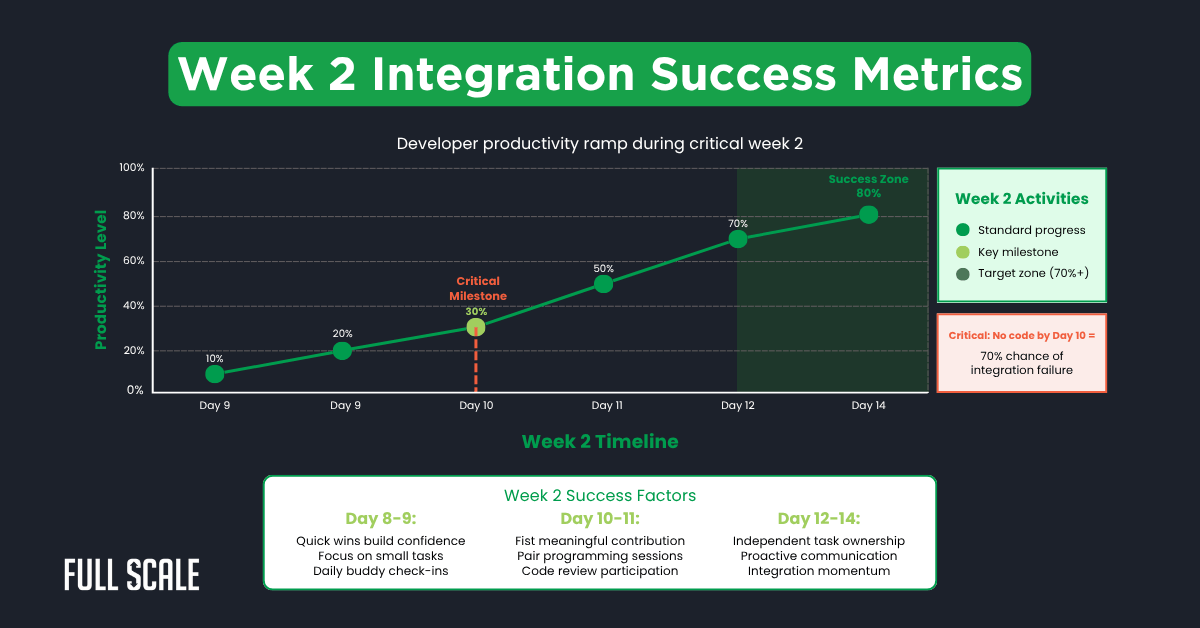
See that steep climb in Week 2? Miss it and you’ll never catch up. I’ve tracked this across teams from Cebu to Chicago. The pattern never changes. This momentum carries into the crucial final phase.
Week 3-4: Achieving Full Integration
The final two weeks solidify or shatter integration success. Developers either become team members or remain outsiders. These weeks determine 12-month retention rates—and require a shift from technical to cultural focus.
Days 15-21: Cultural and Process Integration
Technical competence without cultural fit creates expensive turnover. Week 3 focuses on the human elements that create lasting integration. This investment pays dividends in retention.
Integration Success Markers:
- Initiating Slack conversations beyond work
- Suggesting process improvements
- Helping newer team members
- Taking ownership of features/areas
Days 22-30: Measuring Integration Success
The final week provides clear success indicators. By Day 30, integration either succeeded or failed. These metrics tell the truth when opinions conflict—and they predict long-term success.
Technical Benchmarks:
- Completing stories at 85-95% speed of seniors
- Decreasing code review comments
- Contributing to architecture discussions
- Other developers seeking their input
Cultural Integration Signals:
- Participating in team traditions
- Comfortable with constructive conflict
- Teaching others what they’ve learned
Integration Success Calculator
Measure your developer’s 30-day integration progress
Integration Metrics
Integration Score
Score Breakdown
Recommendation
Start tracking integration metrics to assess progress.
Integration Success Benchmarks
This calculator cuts through BS. Input real numbers from the past week. Below 70% by Week 4? You’ve got problems that won’t fix themselves. Understanding these metrics helps prevent the common failures I see repeatedly.
Common Integration Failures and Prevention
Every integration failure follows patterns. We’ve documented hundreds of failures—mostly our own. Understanding these patterns prevents expensive repetition—and saves you from learning these lessons the hard way.
The Four Integration Killers
These four issues cause 90% of integration failures. Prevent them, and success rates soar. Ignore them and prepare for expensive turnover.
1. No Structured Onboarding Plan
- “Figure it out” isn’t a plan—it’s laziness
- Document every step in a checklist (ours has 127 items)
- Update after each integration based on failures
2. Exclusion from Team Culture
- Remote developers need inclusion in everything
- Mandate social participation (optional = excluded)
- Schedule virtual coffees, games, and casual chats
3. Unclear Success Expectations
- Define integration with measurable goals
- Not “participate in standups” but “lead standup by Day 20”
- Vague hopes create expensive failures
4. Missing Feedback Loops
- Daily check-ins Week 1
- Every-other-day Week 2
- Twice weekly Weeks 3-4
- Five minutes of feedback prevents weeks of misdirection
Now that you understand what kills integration, let me show you why Full Scale’s approach eliminates these risks.
Why Choose Full Scale for Seamless Integration
After years of perfecting remote team integration best practices, we’ve built an infrastructure that makes integration automatic. We don’t just teach you the process—we’ve eliminated the common failure points. Here’s what sets us apart.
I’ve shown you our remote team integration best practices. But here’s why Full Scale’s offshore development services deliver where others fail. We’ve integrated 800+ developers because we solved the hard parts.
What Makes Full Scale Different
- Developers familiar with remote integration
- English proficiency verified
- Cultural training completed
- Technical skills proven through coding tests
Integration Infrastructure:
- Dedicated integration managers
- 4+ hour time zone overlap guaranteed
- Full-time employees with benefits
- Modern facilities with backup systems
Proven Systems:
- 127-point integration checklist
- Success tracking dashboard
- Weekly health reports
- Proactive intervention protocols
Client Success Support:
- Dedicated Success Manager monitoring progress
- Direct access to the troubleshooting team
- Monthly optimization reviews
- Best practices from 60+ clients
Our 95% integration success rate isn’t luck—it’s the result of infrastructure built specifically for seamless integration. This foundation enables the remarkable client results we see consistently.
Real Client Integration Success Stories
Theory means nothing without results. These companies used our remote team integration best practices to solve real problems. Their specific outcomes prove the system works when executed properly.
FinTech Startup: 4 Developers During Product Launch
Crisis creates clarity. This Chicago startup had six weeks until launch and half their team quit. Traditional hiring would take months, they didn’t have.
Results after 30 days:
- All four developers are shipping production code
- Product launched on time with full features
- 100% retention after 18 months
- 40% faster feature delivery than the previous team
Healthcare SaaS: Senior Developer Replacement
Losing a senior developer usually means months of disruption. This company faced that nightmare with critical services at risk. Our process prevented disaster.
Key outcomes:
- 13 days to full autonomy
- Zero production incidents during transition
- New developer improving legacy systems by Day 20
- Three more hires within 60 days
E-commerce Platform: Building QA Team from Scratch
Scaling QA from zero to five simultaneously seemed impossible. Most companies build teams gradually. This platform needed immediate coverage for the holiday season preparation.
Integration results:
- 5 QA engineers integrated simultaneously
- Bug escape rate: 15% → 3%
- Deployment frequency: 4x increase
- All five are still employed after two years
These successes aren’t exceptions—they’re the norm when you follow proven remote team integration best practices.
Making Remote Team Integration Best Practices Work for You
Success requires commitment to the full process. Every shortcut reduces success probability. The math is simple, but the discipline is hard.
I’ve watched companies from East Coast to Silicon Valley nail this process. The difference isn’t location or industry. It’s commitment to doing integration right. Your next developer could be shipping code in 30 days. Or updating their resume. Your choice.
Stop wasting time on failed integrations. Let’s talk about getting this right.
Book a Consultation with Dev Team Integration Experts Now
FAQs: Remote Team Integration Best Practices
Do remote team integration best practices work for non-technical roles?
Yes, but timelines adjust. Sales and marketing roles integrate faster (21 days). Technical writers and designers follow similar 30-day patterns. The framework adapts—principles remain constant.
What if our team has never worked with offshore developers?
Start with one developer, not five. Use them as a test case for your remote team integration best practices. Learn, adjust, and then scale. The first integration is always the hardest.
How much does failed integration actually cost?
Average failed integration costs $12,000-$18,000 in lost productivity, recruiting costs, and team disruption. Successful integration using our checklist costs $2,000 in time investment. The ROI is obvious.
Can we compress the 30-day timeline?
Don’t. We’ve tried the 14-day and 21-day versions. Success rates drop to 60% and 75% respectively. The 30-day timeline exists because it works, not because we like the number.
Should we integrate multiple developers simultaneously?
Yes, if you follow the process exactly. Batch integration creates peer support and shared learning. But don’t exceed 5-6 simultaneous integrations unless you have dedicated integration managers.